Before you sign with a cloud CAD or PDM vendor, or send models to a supplier, get eleven specific commitments in writing, starting with who owns everything generated from your files and ending with how your data leaves. The table below gives the ask and the red flag for each. Later sections explain the wording, the EU Data Act exit rights many buyers overlook, and what changes when the other party is a manufacturer.
The short answer: the clauses to get in writing before you sign
| Clause | Ask for | Red flag |
|---|---|---|
| Ownership and derived data | You own all Customer Data, including viewables, neutral exports, thumbnails, metadata and revision history | “You own your content” with no definition, plus a broad licence “to provide and improve” the service |
| AI and machine learning use | No training of vendor or third-party models on your content without opt-in. Your right to train on your own data confirmed | AI terms only in an acceptable use policy the vendor can change, or a feedback licence wide enough to cover files |
| Location and transfers | A named region for primary data and backups, with notice and approval before any move | “Wherever we or our affiliates operate”, or silence on backups |
| Encryption and keys | A named algorithm at rest and in transit (for example “AES-256 or equivalent”) and stated key handling | “Industry-standard encryption” |
| Access, including vendor staff | Enforceable MFA, guest roles, and vendor staff access only on your approval, logged | Support staff can open any tenant, with no record |
| Logging | Customer-accessible audit logs in your plan, a stated retention period, export, and preservation during incidents | Logs only in a tier you did not buy, or “kept as long as necessary” |
| Breach notice | A clock that starts at discovery, stated hours, defined content and contacts, covering all Customer Data | “Prompt” notice, a clock that starts at “confirmation”, or personal data only |
| Subprocessors | A current list, 30 days’ notice, and an objection right with a real remedy | A list “available on request”, or changes posted to a webpage |
| Certifications and audit | An annual copy of the vendor’s own SOC 2 Type II report or ISO 27001 certificate, with scope | Only the cloud host’s certificates |
| Exit and deletion | An export window, formats with history, deletion that includes backups, and a written certificate | Deletion “within a reasonable time”, export fees, or no export tools |
| Liability | A separate cap for data incidents | Data breaches sitting inside a 12-month-fees cap with every other claim |
Supplier and contract manufacturer agreements reuse most of these rows, but the weight shifts to reuse, sub-tier spread and leftover copies. That part comes later in the article.
This is not legal advice. It is a checklist for preparing a negotiation. Have counsel review the final wording, especially where export control, defence work or several jurisdictions are involved.
Two principles sit behind every row. First, security commitments belong in the signed contract. A link to a policy page the vendor can edit on its own gives you little to enforce, a point made in vendor security review checklists. Second, a certificate does not replace contract terms. A SOC 2 report is useful evidence, but the contract still needs security commitments, incident notice, subprocessor rules, audit rights and deletion. Also prefer specific wording such as “AES-256 or equivalent” over phrases like “according to industry standards”, as InfluenceFlow’s vendor contract guide recommends.
Read the actual terms, not a summary. Autodesk makes the same point in its own note on its December 2025 terms update, telling customers not to rely on summaries, including ones produced by LLMs.
First fix the definitions: make “Customer Data” and “Security Incident” cover design files
Many data processing agreements (DPAs) and breach clauses are written around personal data under the GDPR. That suits an HR system. It fits CAD poorly, because an assembly model, a drawing set or a STEP export is usually not personal data at all. If the breach clause only covers personal data, a leak of your entire product geometry may trigger no notice duty.
Fix this in the definitions, before you negotiate hours and fees. Sample wording to adapt:
“Customer Data” means all data, files and content uploaded, created or stored by or for Customer in the Service. This includes CAD models, assemblies, drawings, metadata, properties, revision history, branches and comments, and any viewables, thumbnails, translations, exports or other representations generated from them.
“Security Incident” means any actual or reasonably suspected unauthorised access to, or acquisition, disclosure, alteration, loss or destruction of, Customer Data, whether or not it includes personal data.
The breach, deletion, location and subprocessor clauses should then refer to Customer Data, not “personal data”. This matches the advice in a CAD-focused pre-signing guide from 24uNet that breach notice should cover your files, not only the vendor’s own systems.
You still need the DPA. CAD environments hold personal data in usernames, author and “last saved by” metadata, comments and access logs. For that data, the GDPR expects processor commitments covering:
- documented instructions and confidentiality
- security
- subprocessors
- assistance
- deletion or return
- audit information
The processor must also tell you about a personal-data breach without undue delay. The GDPR protects people’s data. It does not protect your design IP; the contract definitions do that job.
Cloud CAD/PDM contracts, clause by clause
This section covers the terms for a cloud CAD or PDM subscription. If you have not yet settled whether your team needs a PDM vault or a full PLM system, start with our comparison of what PDM and PLM each control and what they cost, because the answer changes which data the contract has to cover. Whether cloud storage suits your designs at all is a separate decision; see the wider security question of storing CAD in the cloud. Each clause below follows the same pattern: what it means, what good looks like, red flags, and a question you can send the vendor.
Data and IP ownership, including derived data and AI training
In plain words: “You own your content” is a start, but cloud CAD produces a lot of data that is not the file you uploaded. Onshape, for example, says design data never leaves its data centre and clients receive only encrypted visual approximations. The ownership clause needs to cover all of the following, not just your uploads:
- viewables like those visual approximations
- translated neutral exports (STEP, IGES)
- thumbnails
- metadata
- revision history and branches
AI use runs in two directions. Can the vendor use your content to “improve” its services or train models? And can you train your own AI on your own models and outputs?
The Autodesk case shows why both need reading. AEC Magazine reports that an AI-training restriction had been in Autodesk’s terms since May 2018. Read literally, it could have barred customers from training their own AI on output from Autodesk applications. Several firms paused or re-scoped internal AI projects while lawyers interpreted vendor terms.
AEC Magazine says the terms were “materially revised” on 8 December 2025. Autodesk’s own note says data rights are unchanged, that “as always, you own your content”, and that customers “may train on your models and data”, provided they do not use Autodesk offerings to copy or reverse-engineer Autodesk products. AEC Magazine adds that grey areas remain around what counts as “replicating functionality”, and that D5 Render updated its EULA after talking to customers. The lesson is not about one vendor: AI rights can sit in an acceptable use policy you never opened, and they change.
Watch for broad use rights. Autodesk’s 2023 terms, as reproduced in a reseller copy and since replaced, allowed use of customer content “in connection with providing and improving Offerings”. Wording of that shape is common and deserves a precise limit.
What good looks like:
- Ownership covers Customer Data as defined above, including derived representations and metadata.
- The vendor’s licence is limited to operating, securing and supporting the service for you.
- No use of Customer Data to train or fine-tune vendor or third-party AI models without separate, opt-in consent.
- An explicit statement that you may use your own data and outputs for any purpose, including training your own tools.
- Any feedback licence covers your comments about the product, not your files.
Red flags:
- a licence “to provide and improve” the service with no limit
- AI terms that sit only in a policy the vendor can change on its own
- a feedback clause wide enough to cover uploaded content
- ownership language that names only “files you upload”
Ask the vendor: “Please confirm in the contract that Customer Data, including viewables, exports, metadata and revision history, belongs to us. Please also confirm it will not be used to train any AI model without our opt-in, and that we may use it for any purpose, including our own model training.”
Data location and cross-border transfers
In plain words: Where your models and backups physically sit matters for export-controlled designs, defence work, and customers who specify residency in their own contracts. Cloud vendors usually replicate data across sites. Onshape, for instance, says it runs on AWS with databases replicated across geographically separated data centres. It also offers a separate Onshape Government service on AWS GovCloud, which it describes as helping customers meet ITAR and EAR requirements.
What good looks like: a named region for primary data and all backups, with notice and approval before any move. One sample clause from InfluenceFlow’s guide reads “store Customer Data and all backups within [region]”, with 30 days’ notice and your approval before transfer elsewhere. For EU buyers, the Data Act requires providers to publish the jurisdiction of their infrastructure and their measures against unlawful international government access, and to reference both in the contract (Article 28). The Data Act section below covers its other rights.
Red flags: processing “wherever we or our affiliates operate”. Also watch for residency promised for primary storage but silent on backups, support access and disaster recovery sites.
Ask the vendor: “In which regions are our data, backups and disaster recovery copies stored? From which countries can support staff access them? Will you commit to notice and approval before that changes?” Defence contracts may impose their own reporting and flow-down rules, so check those separately. If you are selecting integrated CAD/CAM software at the same time, our buyer’s guide that treats cloud data location as a scored selection factor shows where to raise these questions during the trial rather than at signature.
Encryption at rest and in transit, and who holds the keys
In plain words: The contract should name the encryption used, not promise “industry-standard” protection. Onshape’s page is a useful benchmark of specificity. It states AES-256 encryption for all design data at rest and in transit, HTTPS for all services, and SSL/TLS for internal server-to-database traffic.
What good looks like: wording such as “AES-256 or equivalent” at rest and current TLS in transit. This should sit in the contract or in a security annex that cannot change without notice. Then cover key management as explicit questions:
- Who generates and holds the keys?
- Are customer-managed keys offered, and on which plan?
- Who at the vendor can use the keys?
- What happens to the keys at exit?
Red flags: “commercially reasonable” or “industry-standard” encryption, encryption described only on a marketing page, or no answer on keys.
Ask the vendor: “Which algorithms protect our data at rest and in transit? Who holds the keys, can we manage our own, and are keys destroyed at deletion?” For the technical background, see how CAD file encryption and key handling actually work.
Access controls and vendor staff access
In plain words: Two groups can open your models. One is your own users and guests. The other is the vendor’s admins and support engineers. Contracts usually cover the first group and ignore the second.
What good looks like: MFA that your admin can enforce for every user, and external roles that start with nothing. Onshape, for example, says it blocks login after five failed attempts and offers 2FA. It also says Enterprise admins can tag external collaborators as guests, who start with zero access to company data. For vendor staff, look for access to customer content only for a support case you approve, limited to named roles, and logged.
Red flags: silence on vendor staff access, support engineers able to open any tenant by default, or MFA that is available but not enforceable.
Ask the vendor: “Who on your side can open our models, under what approval? Is every such access logged and visible to us?” For your own side, see our guide to designing permissions for CAD files.
Access logging, log retention and your access to the logs
In plain words: Logs are how you find out who downloaded an assembly and when, and how you prove it later. A vendor logging everything internally is not the same as you being able to see and export those logs. Onshape says “all system activity is logged and audited”. Separately, it describes comprehensive audit trails of user interactions as something Enterprise admins can see. That is a reason to check plan tiers with any vendor.
What good looks like:
- customer-accessible audit logs included in the plan you buy, named in the order form
- a stated retention period
- export in a usable format or via an API
- a duty to preserve logs and cooperate during an incident, which vendor review checklists recommend
Red flags: audit trails described only in marketing material, logs only in a tier you did not buy, retention “as long as necessary”, or no export.
Ask the vendor: “Which user actions are logged (view, download, export, share, permission change)? How long are logs kept, how do we export them, and will you preserve them if an incident occurs?” There is no universal retention figure. Choose one that matches how long your designs stay sensitive and how long a dispute could take to surface.
Breach notification: clock, content and channel
In plain words: A usable clause defines four things: the trigger, the timing, the content and the communication path. The trigger is where wording does most damage. If the clock starts at “confirmation of a reportable breach”, the vendor can investigate for weeks before the hours even begin. Checklists such as Kioptrix’s security addendum list recommend starting the clock at discovery.
Practitioner guidance does not agree on a number, so treat the figures below as negotiating ranges, not law or a fixed standard. StrongSuit uses 72 hours with specified content. Secure Privacy describes 48–72 hours after breach confirmation as the market standard. CloudEagle suggests 48 hours or less from vendor discovery.
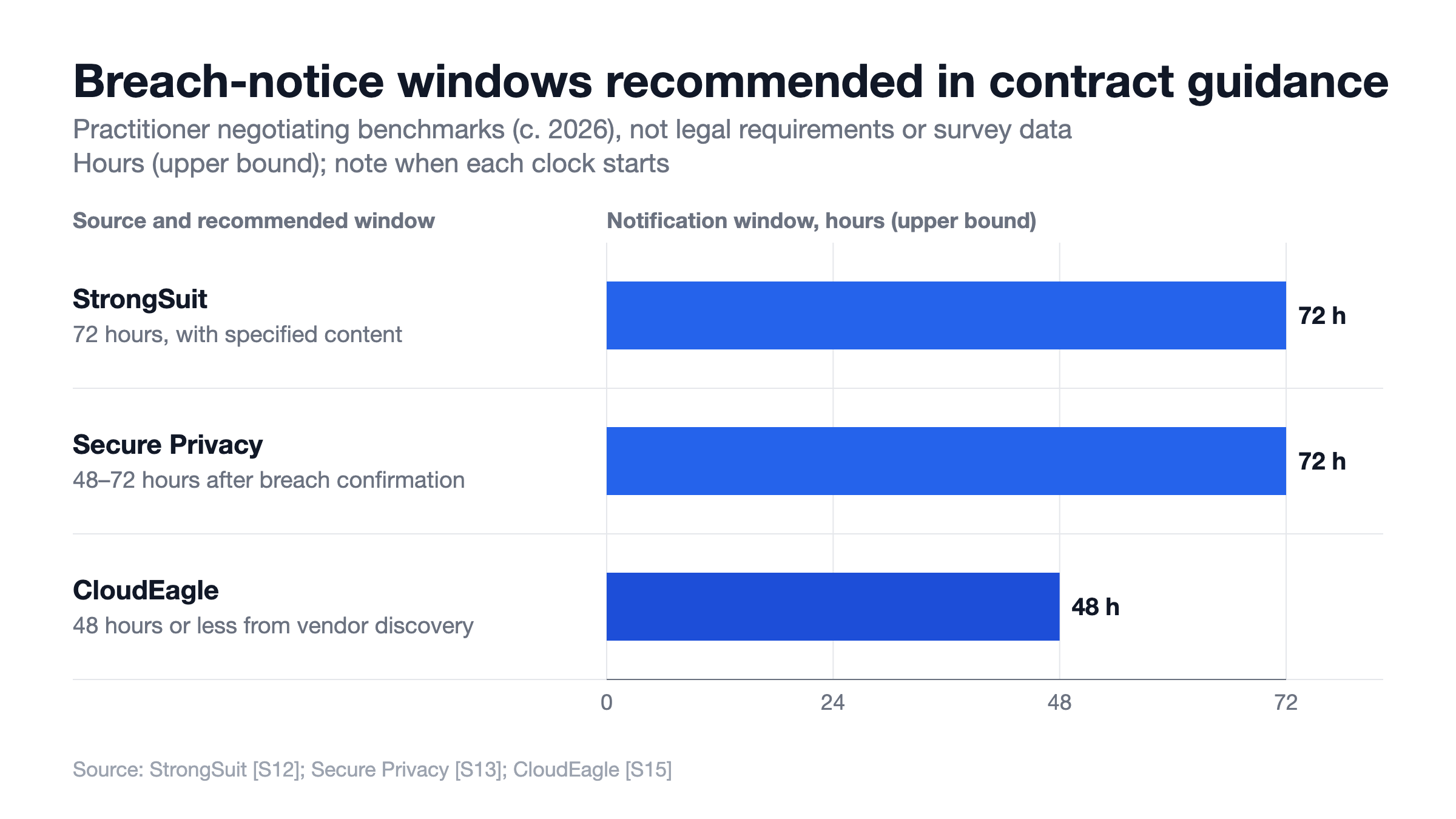
Do not confuse these figures with the GDPR’s 72 hours. That is the controller’s deadline to notify the supervisory authority. The processor’s duty to you is “without undue delay”, which is why your own contract figure matters.
What good looks like:
- notice within a stated number of hours of discovering a Security Incident, as defined above
- content covering the nature of the incident, which data and projects are affected, likely consequences and remediation
- a named contact on each side
- updates as facts emerge
Red flags: “prompt” or “timely” notice with no timeframe, which StrongSuit calls out. Also watch for clocks that start at confirmation, notice limited to personal data, or notice by posting on a status page.
Ask the vendor: “Will you notify us within [48/72] hours of discovering any Security Incident affecting Customer Data, by email to [named contacts], with the details listed in the clause?”
Subprocessors
In plain words: Your CAD may be held or processed by hosting, support, translation or AI providers you never signed with. A subprocessor clause tells you who they are and gives you a say when the list changes.
What good looks like:
- a current list in, or linked from, the contract
- 30 days’ written notice before a new subprocessor is added, as StrongSuit suggests
- a right to object
- the same security obligations flowed down to each subprocessor
Check what an objection actually achieves. BizLeaseCheck points out that some clauses give you a termination right, while others only lead to an escalation discussion.
Red flags: a list “available on request”, changes announced only on a webpage, an objection right with no remedy, or AI providers missing from the list.
Ask the vendor: “Which subprocessors can access our design data, including any AI or translation services? If we object to a new one, can we terminate without penalty and get a refund of prepaid fees?” Standard contractual clauses may cover GDPR transfers of personal data outside the EU, but they do not address geometry.
Certifications and audit rights: whose certificate is it?
In plain words: Vendor security pages often list certificates held by their cloud host, not by the application vendor. Onshape’s pages separate the two: it says it has completed its own SOC 2 Type II audit, and separately that AWS, its infrastructure provider, holds SOC 2, ISO 27001 and NIST 800-53 attestations. When you review any vendor, check which certificates belong to whom.
Infrastructure certificates also do not cover how the application or your tenant is configured. AWS’s ISO 27001 compliance guide says customers remain responsible for security within the AWS Cloud.
What good looks like:
- the vendor’s own SOC 2 Type II report or ISO 27001 certificate, with a scope that covers the service you buy
- an annual right to current audit evidence
- a summary of penetration testing (Onshape, for example, says third-party researchers test its platform continuously)
For most small and mid-sized buyers, an annual evidence right is more practical than on-site audit rights you would rarely use.
Red flags: only the cloud host’s certificates, a certificate scope that excludes the product you are buying, or refusal to share any report under NDA.
Ask the vendor: “Please provide your own current SOC 2 Type II report or ISO 27001 certificate and scope statement, and commit to providing updated evidence each year.”
Exit, export formats and certified deletion
In plain words: You can only leave a cloud CAD or PDM system if you can take the design history with you and the vendor then deletes everything, including backups. In native cloud CAD the data model may not map neatly to files, so test export before you need it.
What good looks like:
- An export window after termination. Vaquill’s review playbook uses 30 days, followed by deletion with certification.
- Export of native and neutral formats, plus revision history, branches, metadata and references between files. 24uNet’s question list asks specifically whether revision history is included.
- Deletion that names backups. Onshape says it takes full backups every 4 hours, and any vendor with frequent backups holds many copies, so the clause must cover them. Secure Privacy cites deletion “including backups within 60 days” as a benchmark.
- A written deletion certificate.
- No “data hostage” terms that make export depend on paying exit fees.
Red flags: deletion “within a reasonable time”, no export tools, or fees to retrieve your own data, all flagged by Clark Meyers. Export limited to the latest version is another.
Ask the vendor: “Which formats and history can we export? How long do we have after termination, when are backups deleted, and will you certify deletion in writing?” The 30- and 60-day figures are practitioner suggestions, not legal requirements. EU buyers have stronger statutory rights, covered in the next section.
Liability caps for data incidents
In plain words: Most SaaS contracts cap liability. A common default, according to Vaquill, is a mutual cap at 12 months’ fees. For a small team on a modest subscription, that cap can be a tiny fraction of what a leaked product design is worth.
What good looks like: a separate data-breach super-cap outside the general cap. Vaquill suggests, for example, 3x the prior 12 months’ fees as a fallback. That is a suggestion, not an established norm.
Red flags: data incidents placed inside the general cap alongside every other claim, or exclusions for “loss of data” that cancel out the security obligations.
Ask the vendor: “Will you agree a separate cap for breaches of your security and confidentiality obligations?” Be realistic: large vendors rarely change caps for standard subscriptions. The other clauses and your own controls usually carry more weight.
EU buyers: exit rights the Data Act already gives you
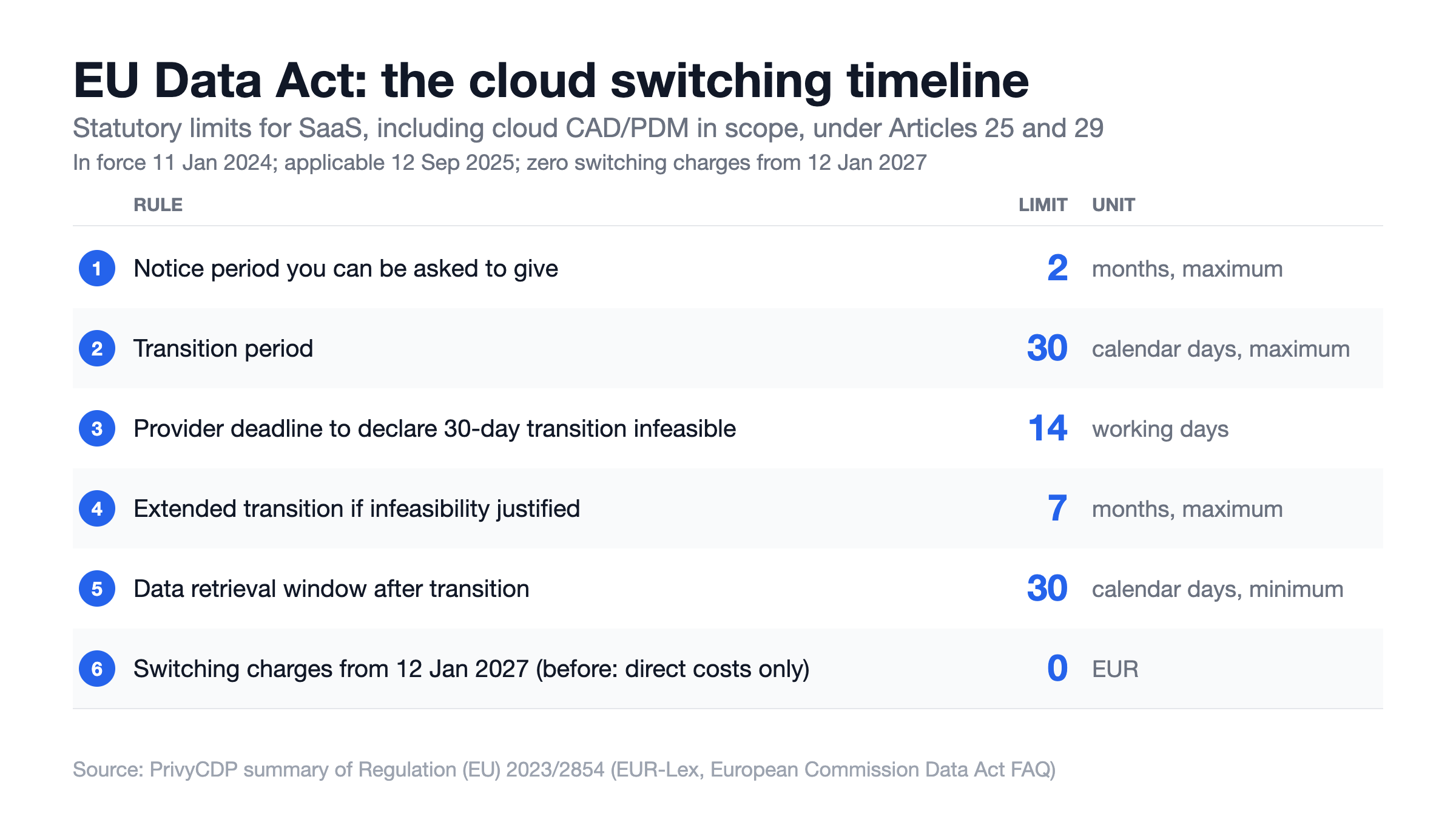
If you buy cloud CAD or PDM as a service in the EU, the Data Act (Regulation (EU) 2023/2854) probably gives you exit rights you do not have to negotiate. It entered into force on 11 January 2024 and has applied generally since 12 September 2025. Chapter VI (Articles 23 to 31) covers switching between data processing services. It applies to providers serving EU customers irrespective of where the provider is established.
According to the European Commission’s FAQ, as summarised by PrivyCDP, data processing services include SaaS. Our reading is that standard cloud CAD/PDM is in scope. Confirm it for your contract, though, because services custom-built for one customer get a lighter regime under Article 31. The details below rest on that secondary summary, which cites EUR-Lex. Check the official text or ask counsel before relying on it.
What the contract must provide (Article 25):
- a notice period of no more than 2 months
- a transition period of no more than 30 calendar days; if that is technically unfeasible, the provider must say so within 14 working days, justify it, and propose an alternative of no more than 7 months
- at least 30 days after the transition to retrieve your data
- an exhaustive list of exportable data
- guaranteed full erasure after the retrieval period
“Exportable data” covers input and output data, including metadata, generated or co-generated by your use of the service, excluding the provider’s trade secrets. For CAD, that gives you a basis to request revision history and metadata. Article 30 requires SaaS providers to offer free open interfaces and export in a structured, commonly used, machine-readable format. The Act does not guarantee any particular CAD format, so name the formats you need in the contract.
On cost, Article 29 sets two stages. Until 12 January 2027, providers may charge only reduced switching charges capped at their direct costs. From 12 January 2027, they may charge no switching charges at all, including data egress for the switch, so check existing contracts now.
You can still be charged:
- standard subscription fees
- proportionate early-termination penalties in fixed-term contracts
- egress for parallel or multi-cloud use
Before you sign, the provider must give clear information on standard fees, early-termination penalties and any switching charges.
Two caveats apply. First, a Digital Omnibus proposal from November 2025 would amend parts of these rules, for example with exemptions for older contracts and for SME providers. It is a proposal, not law, but it could affect how the January 2027 rule applies to contracts signed before 12 September 2025. Second, statutory rights are easier to use when the contract already lists the exportable data and the erasure commitment, so ask for both now.
Supplier and manufacturer contracts: where the emphasis shifts
An RFQ package to a fabricator, toolmaker or contract manufacturer (CM) typically includes the BOM, 3D CAD, 2D drawings and volumes, as ePower notes. The risks here are different. Your data may be reused for another customer, spread to sub-tier suppliers you never met, or left behind after the job. The clauses below use the same pattern in shorter form. For the limits of the NDA itself, see what an NDA can and cannot do for CAD files.
Define the information and limit its use
Good:
- Confidential information explicitly includes CAD files, drawings, process parameters and tooling, as LexDraft’s manufacturing NDA guide lists.
- Use is limited to the named project or part numbers.
- Confidentiality for trade secrets lasts indefinitely, which Dewin recommends for sheet-metal sourcing.
Red flags: a definition limited to documents marked “confidential”, use permitted for general “business purposes”, or one short fixed term that also covers trade secrets.
Ask: “Will you confirm our files are used only for quoting and producing [part numbers] for us?”
Flow-down to sub-tier suppliers
Good: prior written approval before files go to affiliates, toolmakers, labs or overseas plants, with the same obligations flowed down in writing.
Red flags: “may share with subcontractors as needed”.
Ask: “How do you share data with sub-tier suppliers, and do you keep a record of who received what?” Flow-down obliges the CM to impose your terms on its subcontractors. It does not automatically give you a direct claim against a sub-tier shop you never contracted with, so make the CM’s responsibility for its subcontractors explicit.
Return, destruction and no retained derived models
Good:
- return or destruction of drawings, data, moulds, parts, scrap and electronic copies
- coverage of laptops, cloud folders, project tools, email and backups, plus removal of access, as Sprintlaw’s contractor NDA guidance suggests
- written certification within a set period, such as the 10 business days used in one NDA template
The CAD-specific gap: destruction clauses list your files and prints but rarely the things the supplier built from them. We recommend naming them explicitly. Derived models can carry your design into another job even after your original files are deleted. This is our recommendation, not yet a standard clause:
- CAM programs
- re-modelled or converted geometry
- fixture and tooling models
- inspection programs derived from your CAD
Red flags: broad carve-outs. Suppliers’ own NDAs can include them. PCBWay’s 2026 NDA, for example, says “return or destroy… except that the Recipient may…”. Read whatever follows in your supplier’s text. Accept only narrow exceptions, and keep confidentiality running on anything retained.
Ask: “Which copies, including derived programs and models, will you keep after the project, and why?”
Proof of what was shared, with whom and when
A use limit or destruction clause is only as strong as your record of which revision went to which supplier.
Good: a transmittal log on your side with these fields, and an equivalent record kept by the CM for its sub-tier suppliers:
- file name and revision
- a file fingerprint (a cryptographic hash identifies the exact file)
- date
- recipient
- purpose
If a part turns up somewhere it should not, that record lets you show what you sent and when. A controlled spreadsheet with hashes works; so do PDM transmittals or dedicated tools.
Red flags: no record of which revision was sent to whom, or a CM that cannot say which sub-tier shops hold your files.
Ask: “Will you keep, and share on request, a log of which of our files went to which sub-tier supplier, and when?”
Where the contract stops and technical controls carry the load
A clause is enforceable only if you can detect a breach and show it happened, and it never stops a copy leaving. Contracts set expectations and remedies. Technical controls make those expectations observable.
| Contract commitment | Technical support |
|---|---|
| Access and use limits | Role-based permissions, guest accounts, expiring links |
| Encryption commitments | Encryption you can verify, and key handling you control where possible |
| Use limits after files leave | DRM or IRM that enforce view, edit, print or expiry rules on the file |
| Breach detection and proof | Access logs you hold, file fingerprints, timestamps, transmittal records |
| Your side of shared responsibility | Tenant configuration: MFA enforcement, guest reviews, offboarding |
The vendor’s certificate does not cover your configuration, and customer-accessible audit trails can depend on plan tier. Some of this work sits with you regardless of what you sign. For files that leave your systems, see choosing between DRM and IRM for files that leave your systems. For the ways files get out in practice, see common ways CAD files are exposed.
CADChain’s Boris plug-ins are one option for the evidence part. They record file fingerprints, timestamps and access records for CAD files shared with partners. If your files never leave a well-logged cloud CAD tenant and partners work inside it as guests, the vendor’s own audit trail may be enough.
If you have little leverage: what to push for first
On a standard click-through subscription, you will rarely change the main terms. Vendors are more often willing to:
- answer questions in writing
- add a note to the order form
- point you to a DPA or security annex that already contains better terms than the headline agreement
Terms do move over time: Autodesk revised its AI wording in December 2025. That is context, not something an individual small buyer can count on.
Priorities, in order:
- Definitions of Customer Data and Security Incident that cover design files and derived data.
- Breach notice that starts at discovery, with a stated number of hours.
- Export including revision history and metadata, and certified deletion that includes backups.
- A current subprocessor list with advance notice of changes.
- Your right to current audit evidence each year.
Where terms cannot change, send the “Ask the vendor” questions above and keep the written answers with the contract. Then close the gaps with your own controls. EU buyers with in-scope contracts have the Data Act switching rights whatever their negotiating position. As a next step, run our broader CAD security checklist against the files you are about to share.
Frequently asked questions
Do we need a data processing agreement if our CAD files contain no personal data?
Usually yes, because CAD and PDM systems still hold usernames, author metadata and access logs, and the DPA covers that layer. Your designs need the Customer Data and Security Incident definitions described earlier.
Does the EU Data Act apply if our cloud CAD vendor is based in the US?
It can. According to PrivyCDP’s summary, Chapter VI applies to providers serving EU customers irrespective of where they are established, and SaaS counts as a data processing service. Services custom-built for one customer get a lighter regime, so confirm the scope for your specific contract.
Should we renegotiate existing cloud CAD/PDM contracts before 12 January 2027?
From that date, in-scope providers may no longer charge switching or switch-related egress fees. Before then, review existing contracts for switching fees, a list of exportable data and an erasure commitment, and ask the vendor in writing how it will comply. Keep in mind that the Digital Omnibus proposal could change exemptions for contracts signed before 12 September 2025. Ask counsel how this affects your contracts.
Who should review these clauses: legal, IT or engineering?
All three, with different jobs. Engineering knows which outputs, formats and revision history must survive an exit. IT or security checks encryption, access, logging and subprocessors. Legal turns the agreed positions into enforceable wording and checks liability and governing law. A one-page brief listing your answers to the table above saves everyone time.
What can we do if a supplier refuses to certify deletion of our CAD files?
Ask what they need to keep and why. Some exceptions are legitimate, such as legally required archive copies. Accept narrow, named exceptions with confidentiality continuing on retained copies, and require derived models such as CAM programs to be deleted. If they still refuse, send less: drawings or neutral exports instead of full native models, or view-only access. Keep your transmittal log either way.
Is a vendor’s SOC 2 report enough if they will not agree to audit rights?
For most small and mid-sized buyers, an annual right to the vendor’s own current SOC 2 Type II report or ISO 27001 certificate is a reasonable substitute for on-site audits. Check whose certificate it is and its scope, as described in the certifications section, and keep contract terms on breach notice, subprocessors and deletion regardless.