
Most engineers think their CAD files are safe behind corporate firewalls. They’re wrong. In 2026, a single malicious MODEL file can execute arbitrary code on your workstation, leak intellectual property worth millions, and bring your entire engineering operation to a halt. While you’re focused on designing the next breakthrough product, attackers are exploiting vulnerabilities you didn’t know existed.
Here’s what you need to know: CAD file security isn’t optional anymore. With ransomware attacks projected to surge by 40% through 2026 and manufacturing now the most-attacked industry globally, your design files are frontline targets. This guide reveals the vulnerabilities lurking in your CAD workflows, shows you exactly how attackers exploit them, and gives you actionable strategies to protect your intellectual property before it’s too late.
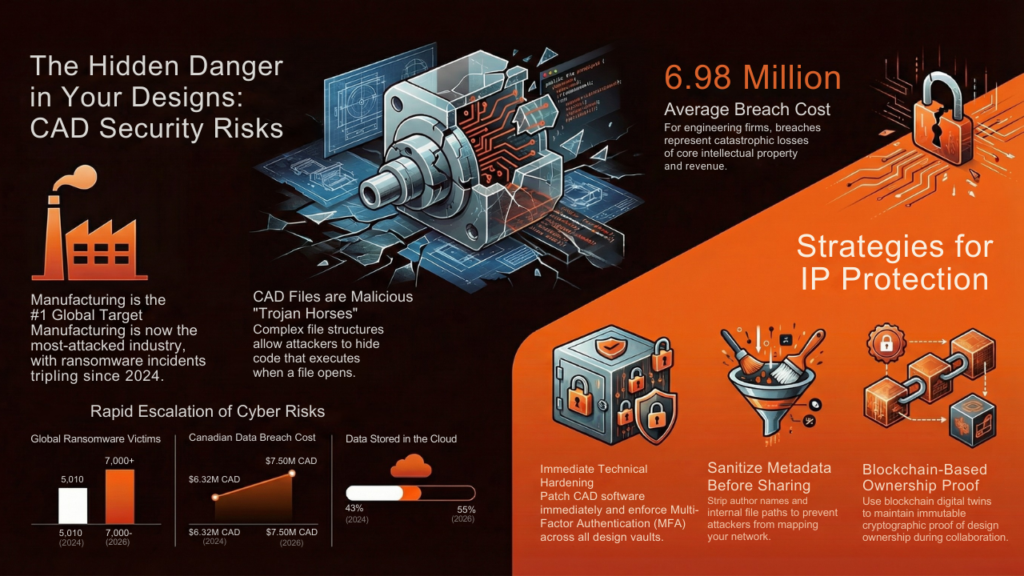
What Makes CAD Files Uniquely Vulnerable in 2026
CAD files carry unique security challenges that standard office documents don’t face. These files contain complex geometric data, embedded metadata, and intricate file structures that require specialized software to open. This complexity creates multiple attack surfaces.
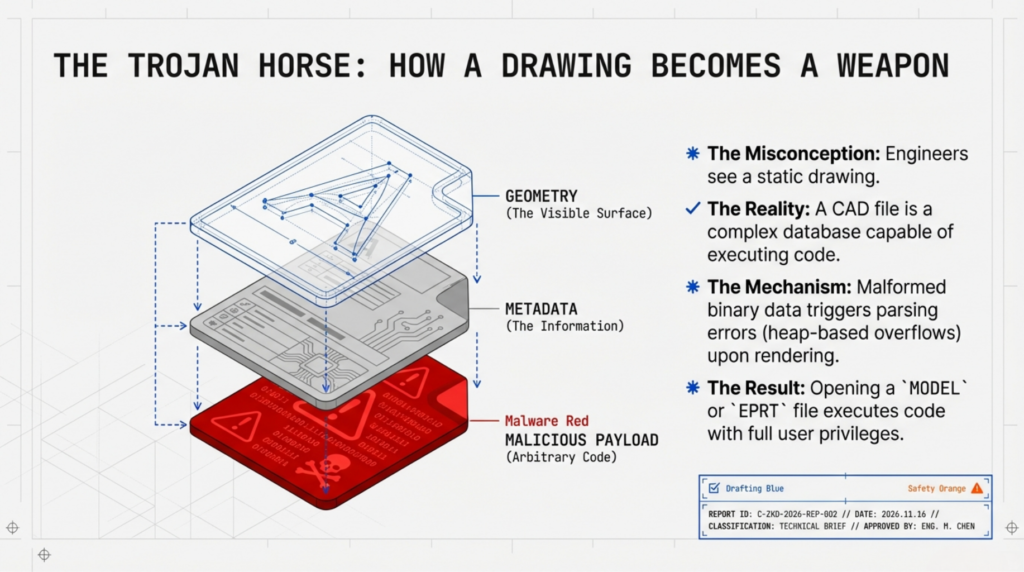
The structure of CAD files makes them difficult to protect using conventional security measures. Large binary files with intricate layers of data require specialized parsers to interpret. When these parsers encounter malformed or malicious input, vulnerabilities emerge. Attackers exploit these parsing weaknesses to inject malicious payloads that execute when an engineer opens what appears to be a legitimate design file.
CAD files also move through extensive collaboration chains. Engineering teams share designs with suppliers, contract manufacturers, offshore partners, and clients. Each handoff creates potential exposure. Once a CAD file leaves your secure network via email, cloud storage, or collaboration platforms, traditional perimeter-based security loses effectiveness.
According to IBM’s 2025 Cost of a Data Breach Report, manufacturing data breaches now cost an average of $6.98 million CAD. For engineering firms, the stakes are even higher since CAD files represent core intellectual property that directly drives competitive advantage and revenue.
The Explosive Growth of CAD-Targeted Cyberattacks
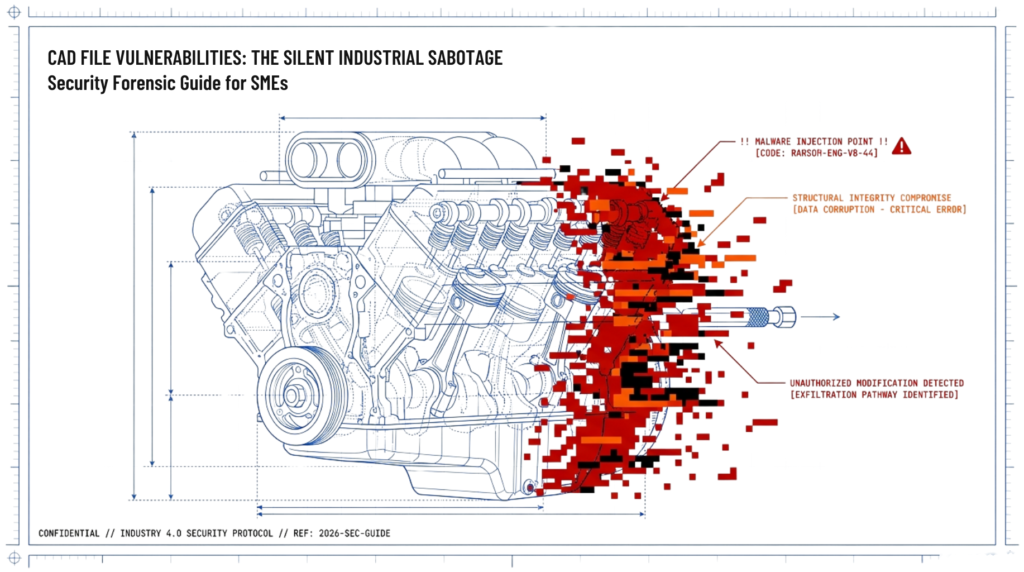
Manufacturing and engineering sectors face unprecedented cyber threats in 2026. IBM’s X-Force Threat Intelligence Index 2024 identified manufacturing as the most-attacked industry globally, holding the top position in Asia-Pacific and Europe, and ranking second in Latin America.
Ransomware remains the dominant threat vector. QBE Canada’s 2025 cybersecurity report projects ransomware victims publicly named on leak sites will jump from 5,010 in 2024 to over 7,000 by the end of 2026, representing a five-fold increase since 2020. Ransomware incidents nearly tripled year-over-year in Q1 2025, reaching 1,537 cases compared to 572 in Q1 2024.
Canada experienced 30 significant cyber incidents over the past two years, accounting for 6.7% of the global total. North America overall represented over 50% of incidents. Canadian organizations faced an 86.5% chance of experiencing at least one cyberattack in the past 12 months, according to CDW Canada’s 2024 research.
The financial impact continues escalating. The average Canadian data breach cost hit $6.98 million CAD in 2025, up from $6.32 million in 2024. Organizations that experience ransomware attacks see particularly severe consequences, with 74% of Canadian businesses ultimately paying ransoms averaging nearly $25,000.
Cloud adoption amplifies risk exposure. Half of all data worldwide now resides in the cloud, up from just 10% in 2015. High-severity cloud alerts surged 235% in 2024 compared to 2023, reflecting both increased adoption and attacker sophistication. Nearly half of corporate data stored in cloud environments is classified as “sensitive,” making it a prime ransomware target.
Critical CAD File Format Vulnerabilities Actively Exploited
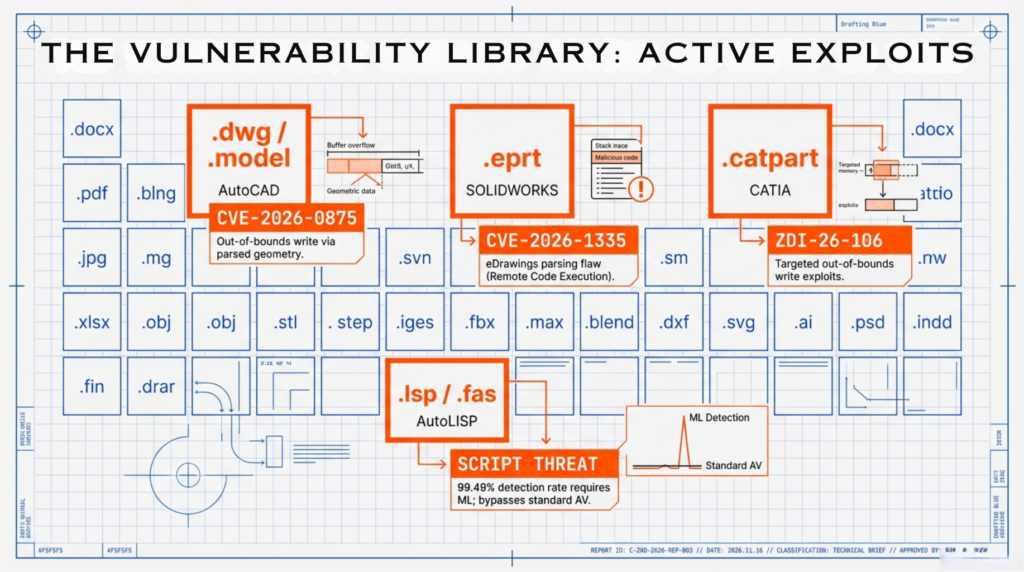
Specific CAD file formats carry documented vulnerabilities that attackers actively exploit in 2026. Understanding these risks helps engineering teams prioritize protective measures.
AutoCAD File Format Exploits
Autodesk AutoCAD and related products face multiple high-severity vulnerabilities disclosed in 2025 and 2026. CVE-2026-0875 affects AutoCAD’s MODEL file parser, allowing out-of-bounds write conditions that enable arbitrary code execution. When users open malicious MODEL files, attackers can trigger application crashes, corrupt data in memory, or execute code with current user privileges.
CVE-2026-107 similarly exploits MODEL file parsing through out-of-bounds write vulnerabilities. ZDI-26-106 targets CATPART file parsing with the same technique. These vulnerabilities all require user interaction( the target must open the malicious file) but once triggered, allow full code execution in the context of the current process.
CVE-2025-9453 demonstrates how shared components across Autodesk products create cascading vulnerabilities. A maliciously crafted PRT file triggers out-of-bounds read vulnerabilities that can crash applications, disclose sensitive information from adjacent memory, or execute arbitrary code. The vulnerability affects Autodesk Shared Components 2026.0, impacting multiple products in the Autodesk suite.
Multiple other CVEs affect AutoCAD 2025 and 2026 versions:
- CVE-2025-1427, CVE-2025-1649, CVE-2025-1650: Uninitialized variable vulnerabilities in CATPRODUCT file parsing
- CVE-2025-1428, CVE-2025-1433, CVE-2025-1652: Out-of-bounds read vulnerabilities in CATPART and MODEL files
- CVE-2025-1429, CVE-2025-1651: Heap-based overflow vulnerabilities in MODEL files
- CVE-2025-1430: Memory corruption vulnerability in SLDPRT file parsing
- CVE-2025-1432: Use-after-free vulnerability in 3DM file parsing
SOLIDWORKS and eDrawings Vulnerabilities
SOLIDWORKS eDrawings faces serious remote code execution vulnerabilities in 2026. CVE-2026-1335 targets EPRT file parsing, creating out-of-bounds write conditions that allow arbitrary code execution. Attackers craft malicious EPRT files that exploit memory corruption when users open them in eDrawings.
CVE-2026-1333 demonstrates use-of-uninitialized-variable vulnerabilities in eDrawings’ EPRT file handling. The software uses variables not properly initialized during file parsing, leading to undefined behavior and memory corruption. This vulnerability affects design and manufacturing sectors heavily reliant on SOLIDWORKS for CAD visualization and collaboration.
AutoLISP Malware in CAD Files
Research published in Engineering Applications of Artificial Intelligence (December 2024) revealed sophisticated malware distribution through AutoLISP scripts. Attackers embed malicious payloads in LSP (AutoLISP source) and FAS (Fast AutoLISP) files that execute within AutoCAD environments.
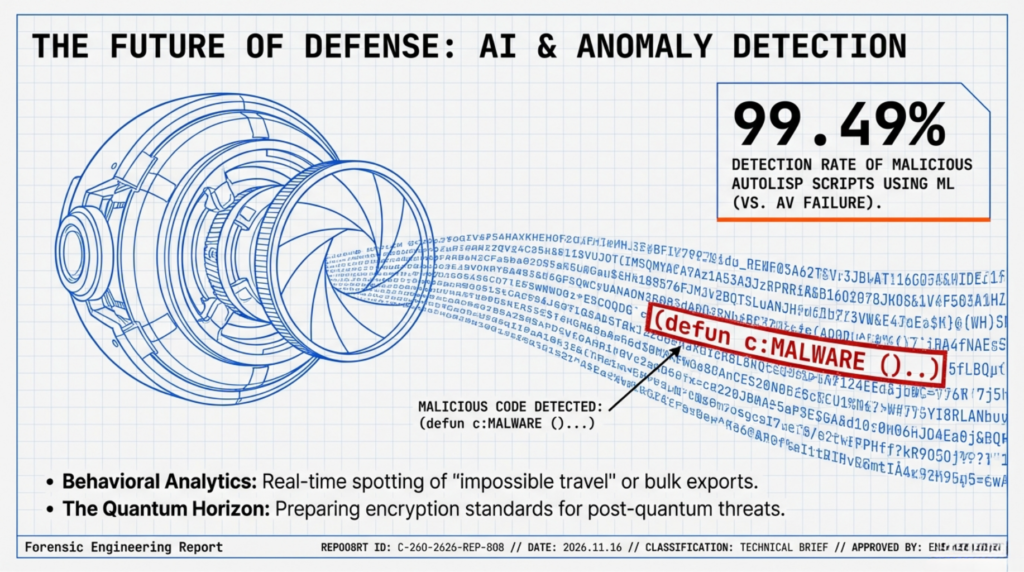
These non-DWG script files represent a significant threat vector because antivirus solutions often miss them. Machine learning research analyzing 6,418 LSP files (both malicious and benign) achieved 99.49% true positive detection rates with only 0.57% false positives using knowledge-based feature extraction. However, many organizations lack specialized detection capabilities for AutoLISP malware.
How Attackers Exploit CAD File Vulnerabilities
Understanding attack methodologies helps engineering teams recognize and prevent exploitation attempts. Attackers use predictable patterns to weaponize CAD file vulnerabilities.
Social Engineering Delivery Methods
Most CAD file exploits require user interaction. Attackers cannot remotely trigger vulnerabilities without someone opening a malicious file. This makes social engineering the primary delivery mechanism.
Phishing emails targeting engineering departments disguise malicious CAD files as legitimate design updates, supplier specifications, or client requests. These emails often impersonate known contacts, reference real projects, and create urgency to bypass scrutiny. Subject lines might read “URGENT: Design revision needed by EOD” or “Client feedback on Q2 prototype attached.”
Watering hole attacks compromise websites engineering teams frequently visit. When engineers download CAD resources, plugins, or documentation from compromised sites, they unknowingly receive malicious files. Vendor portals, CAD tutorial sites, and engineering forums represent high-value targets for this approach.
Supply chain compromises inject malicious code into legitimate CAD plugins, add-ins, or third-party converters. Engineering environments rely heavily on these tools, and users typically install them without suspecting malicious content. A compromised plugin for SOLIDWORKS or AutoCAD can persist on systems for months, exfiltrating files or creating backdoors.
Exploitation Chain After File Opening
Once a victim opens a malicious CAD file, the exploitation chain unfolds rapidly. The malformed file triggers a parsing error in the CAD application. Memory corruption vulnerabilities allow attackers to write data beyond allocated buffer boundaries or read from uninitialized memory locations.
This memory manipulation enables arbitrary code execution within the context of the CAD application. Since engineers typically run CAD software with standard user privileges, attackers inherit those permissions. They can then:
- Exfiltrate CAD files and intellectual property to external servers
- Install ransomware that encrypts CAD vaults and PLM repositories
- Establish persistent backdoors for long-term access
- Move laterally across the network to compromise additional systems
- Modify design files to introduce subtle defects or backdoors into physical products
The Canadian Centre for Cyber Security’s National Cyber Threat Assessment 2025-2026 warns that state-sponsored actors increasingly conduct disruptive attacks rather than just espionage. Attackers might deliberately corrupt CAD files to sabotage manufacturing operations or modify designs to create product failures that damage reputations.
Ransomware Targeting PDM and PLM Systems
Ransomware groups specifically target Product Data Management (PDM) and Product Lifecycle Management (PLM) systems because they contain canonical product data needed for manufacturing. Encrypting these vaults halts engineering and production simultaneously.
CAD data faces unique ransomware challenges. Large binary files and slow continuous backups increase windows for successful encryption. Vault-locking ransomware can corrupt file references and bills of materials, turning a single encrypted file into cascading assembly breakage. Even if you restore files from backup, broken references might require extensive manual repair.
Double-extortion ransomware combines encryption with data theft. Attackers exfiltrate CAD files before encrypting them, then threaten to publish intellectual property if you don’t pay twice: once for decryption keys, once for data suppression. Manufacturing firms face existential threats from IP publication since competitors can immediately copy products.
Metadata Leakage: The Hidden CAD Security Risk
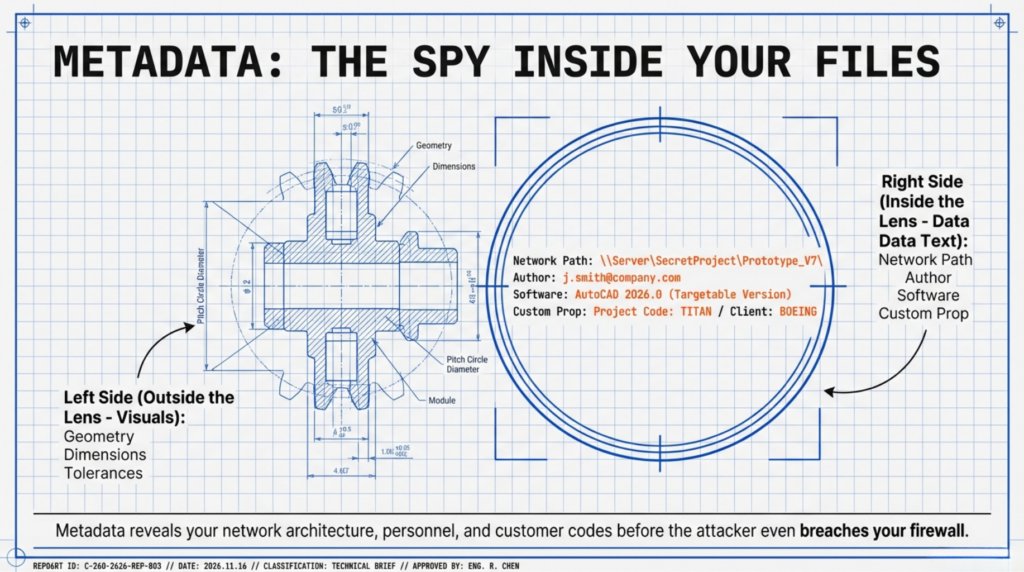
CAD files contain extensive metadata beyond visible geometry. This hidden information creates security risks that engineers often overlook.
What Metadata CAD Files Contain
CAD metadata includes:
- Author names and user accounts
- Creation and modification timestamps
- File paths revealing internal directory structures
- Software version information
- Linked external references and file dependencies
- Custom properties containing project codes, part numbers, customer names
- Revision history and change tracking data
- Comments and annotations
- Material specifications and manufacturing processes
- Assembly relationships and hierarchies
How Metadata Enables Reconnaissance
Attackers mine CAD metadata to map organizational structures, identify key personnel, understand project workflows, and discover valuable intellectual property. File paths reveal internal network architectures. Author information identifies engineers for targeted phishing. Timestamps indicate work schedules and project deadlines. Custom properties expose customer relationships and contract details.
This reconnaissance enables more sophisticated attacks. Instead of sending generic phishing emails, attackers craft messages referencing actual projects, using proper terminology, and timing delivery for maximum urgency. They know which engineers work on which projects and can impersonate appropriate contacts.
Metadata also reveals technology stacks and software versions. When attackers know you run AutoCAD 2026.0, they target known vulnerabilities for that exact version. Version information from metadata helps them select appropriate exploits.
Real-World Metadata Leakage Scenarios
Engineering firms sharing CAD files with suppliers inadvertently disclose:
- Internal project codenames appearing in custom properties
- Confidential customer information embedded in part descriptions
- Cost data and margin calculations stored in custom fields
- Supplier relationships revealed through linked external references
- Manufacturing process details in material specifications
Contract manufacturers receiving design files can reverse-engineer client information from metadata even when geometry is protected. A PDM system export might contain complete revision history showing design evolution, failed attempts, and engineering decision-making that represents valuable competitive intelligence.
Cloud CAD and SaaS Integration Vulnerabilities
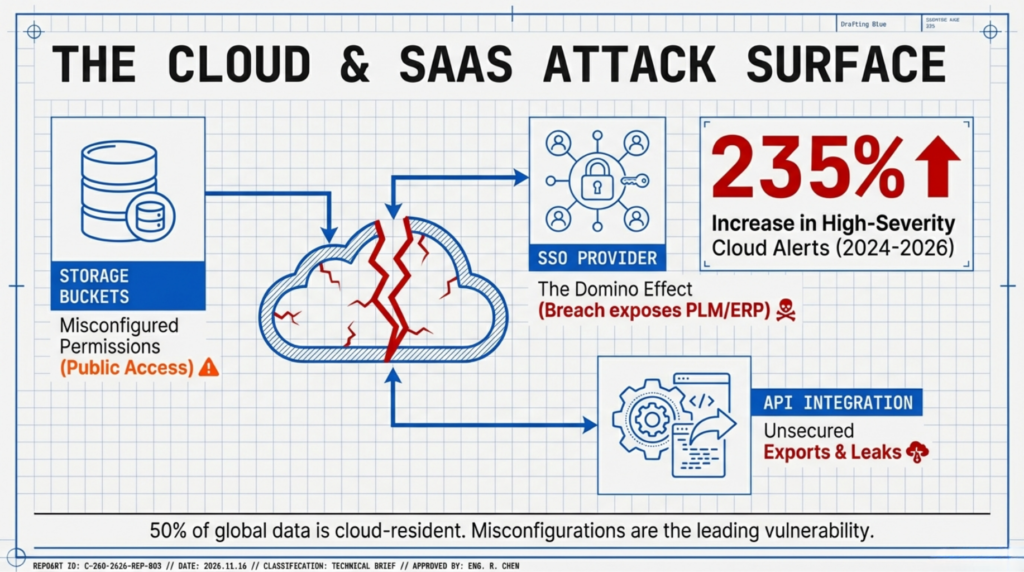
Cloud-first Product Data Management and Software-as-a-Service integrations create fresh attack surfaces for engineering teams in 2026. While cloud platforms provide collaboration benefits, they also introduce security challenges.
Cloud Storage Security Gaps
Engineering data increasingly resides in cloud storage services like Autodesk Fusion 360 Team, Onshape, and cloud-based PLM platforms. This shift brings new risks:
Cloud platforms handle 50% of global data storage in 2026, up from 43% in 2024. High-severity cloud alerts increased 235% in 2024 compared to the previous year. Nearly half of corporate cloud data is classified as sensitive, making it prime targets for ransomware and data theft.
Misconfigurations represent the leading cloud vulnerability. Incorrectly configured access controls can expose entire CAD libraries to internet access. Public cloud storage buckets containing engineering files have been discovered through automated scanning tools, leading to IP theft.
Business email compromise attacks exploit Microsoft 365 and other cloud services that engineering teams use for CAD collaboration. These attacks bypass traditional security checks and are harder to detect. A compromised Microsoft 365 account provides access to SharePoint sites, OneDrive folders, and Teams channels where CAD files are shared.
Third-Party Integration Risks
Engineering environments rely on numerous third-party integrations: plugins, add-ins, converters, and API connections. Each integration creates potential security weaknesses.
Single sign-on provider breaches demonstrate cascading risks. When Okta suffered a breach in 2023, it exposed 134 business clients and wiped $2 billion from market value. A compromised authentication provider grants attackers access to every connected service, including CAD vaults.
API vulnerabilities in CAD platforms allow unauthorized data access. Poorly secured APIs might leak file contents, allow unauthorized modifications, or enable bulk downloads of design libraries. Rate limiting failures can allow attackers to exfiltrate entire CAD repositories through API abuse.
Supply chain attacks targeting CAD tooling inject malware into legitimate vendor software. A compromised plugin distributed through official channels can bypass security controls because users trust vendor-signed code. These attacks are particularly dangerous because they affect many organizations simultaneously.
AI-Powered Cloud Threats
Generative AI adoption creates new attack vectors. Organizations using AI features in cloud CAD platforms may inadvertently expose sensitive designs to AI training processes. Cloud AI services that process CAD data for automation, optimization, or generative design might retain copies of intellectual property.
Deepfakes now appear in nearly 10% of successful cyberattacks, with fraud losses ranging from $250,000 to over $20 million per case. AI-generated deepfake videos or voice recordings can impersonate executives or engineers, authorizing fraudulent file transfers or system access changes.
AI also lowers barriers for attackers. Generative AI assists cybercriminals in script development and malware coding, enabling less-skilled actors to launch sophisticated attacks. This democratization of hacking capabilities means engineering teams face threats from a broader range of adversaries.
Insider Threats: When the Danger Comes from Within
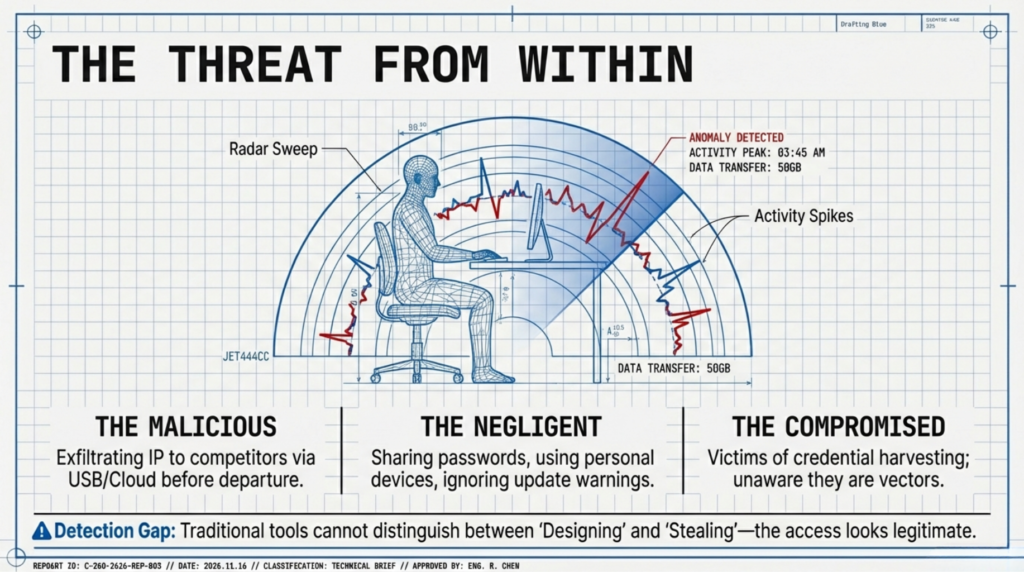
External attackers dominate security headlines, but insider threats pose equally serious risks to CAD security. Employees and contractors with legitimate access to engineering systems can cause catastrophic damage through malicious intent or negligence.
Types of Insider Threats
Malicious insiders deliberately steal intellectual property for personal gain. Departing employees might exfiltrate CAD files before joining competitors. Engineers with financial troubles might sell designs to foreign actors. Disgruntled staff might sabotage files or leak proprietary information for revenge.
Negligent insiders unintentionally compromise security through poor practices. Sharing login credentials, using weak passwords, falling for phishing attacks, or storing CAD files on personal devices create vulnerabilities. Engineers working from home on unsecured networks expose files to interception.
Compromised insiders have their accounts or devices taken over by external attackers. Social engineering tricks engineers into revealing credentials. Malware on personal devices steals passwords. Phishing emails compromise corporate accounts that then access CAD systems.
Detection Challenges
Insider threats are notoriously difficult to detect because insiders have legitimate access to CAD systems. Their activities blend with normal workflow patterns. Traditional perimeter security cannot distinguish between authorized use and malicious activity.
Warning signs include:
- Unusual file access patterns: accessing files outside normal project assignments
- Bulk downloads of CAD files, especially before resignation dates
- After-hours access from unusual locations
- Repeated failed access attempts to restricted files
- Using USB drives or personal cloud storage for CAD files
- Excessive printing or exporting of designs
- Disabling security controls or clearing audit logs
Many organizations lack monitoring capabilities to detect these patterns. Only 11% of Canadian SMBs maintain formal incident response plans, and 52% have no plan whatsoever, according to the Insurance Bureau of Canada’s 2025 data.
Real-World Insider Threat Cases
Manufacturing companies regularly face IP theft from departing engineers. A senior designer leaving for a competitor might copy years of product development onto USB drives during their notice period. Contract manufacturers receiving client designs sometimes produce unauthorized copies for different customers. Offshore development partners may reverse-engineer products using CAD files intended only for specific manufacturing purposes.
According to CIRA’s Cybersecurity Survey 2025, 74% of Canadian businesses that experience ransomware attacks ultimately pay ransoms. Insider threats contribute to this problem: employees might intentionally introduce ransomware for financial kickbacks from attackers.
CAD-to-Manufacturing Convergence Risks
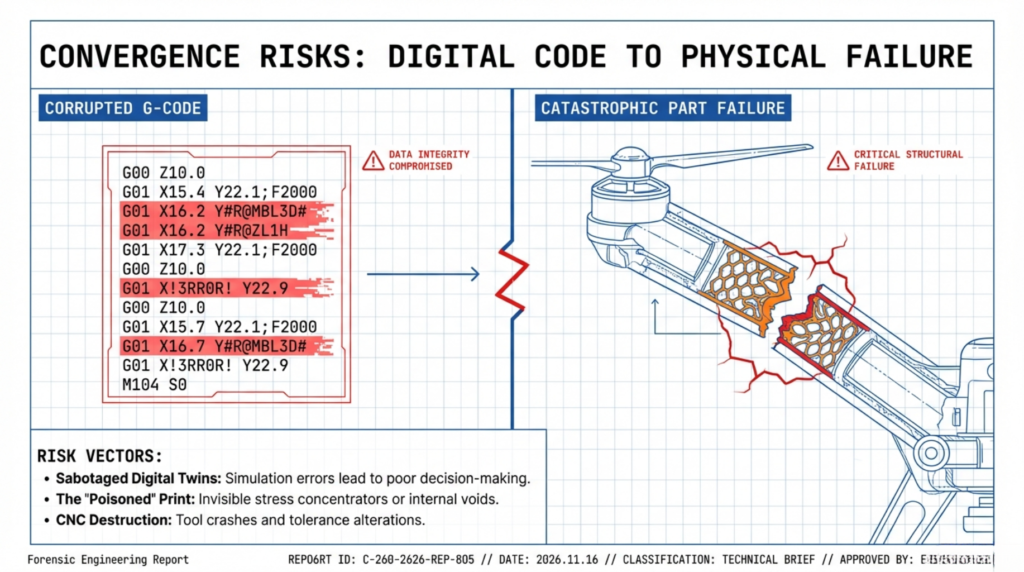
Digital design increasingly feeds directly into automated manufacturing systems, creating operational technology (OT) risks. This CAD-to-manufacturing convergence means CAD file compromises can disrupt physical production and potentially cause safety incidents.
Digital Twin Vulnerabilities
Digital twins (virtual replicas of physical products or manufacturing systems) rely on CAD data for accuracy. Compromised CAD files corrupt digital twins, leading to:
- Simulations producing incorrect results that guide poor decisions
- Predictive maintenance systems failing to anticipate equipment failures
- Quality control systems missing defects because models don’t match reality
- Production planning errors from inaccurate capacity models
Attackers who modify CAD files used for digital twin creation can introduce subtle changes that accumulate into major failures. A small dimensional change might seem insignificant in isolation but could cause assembly issues when hundreds of parts are manufactured.
Additive Manufacturing Security
3D printing directly from CAD files eliminates traditional manufacturing steps, also eliminating opportunities to catch errors or sabotage. Malicious modifications to STL, OBJ, or other 3D printing formats can:
- Create stress concentrators that cause premature part failure
- Introduce internal voids that compromise structural integrity
- Alter tolerances that prevent proper assembly
- Change material properties that affect performance
These modifications might be invisible to visual inspection. Parts appear correct but fail under stress. For critical applications in aerospace, medical devices, or automotive safety systems, compromised additive manufacturing poses serious safety risks.
CNC Programming Risks
Computer Numerical Control (CNC) machining programs derive from CAD models. G-code and toolpath files represent valuable intellectual property because they encode manufacturing processes. Stolen CNC programs allow competitors to replicate products without reverse-engineering.
Sabotaged CNC programs can damage expensive machining equipment. Modified tool paths might cause crashes, break expensive tooling, or damage workpieces. These programs typically run with minimal operator supervision, so malicious changes may not be noticed until damage occurs.
Protecting CAD Files: Actionable Security Strategies
Engineering organizations need comprehensive strategies to secure CAD data against 2026’s threat landscape. Effective protection requires combining technical controls, process improvements, and user awareness.
Immediate Actions You Can Take Today
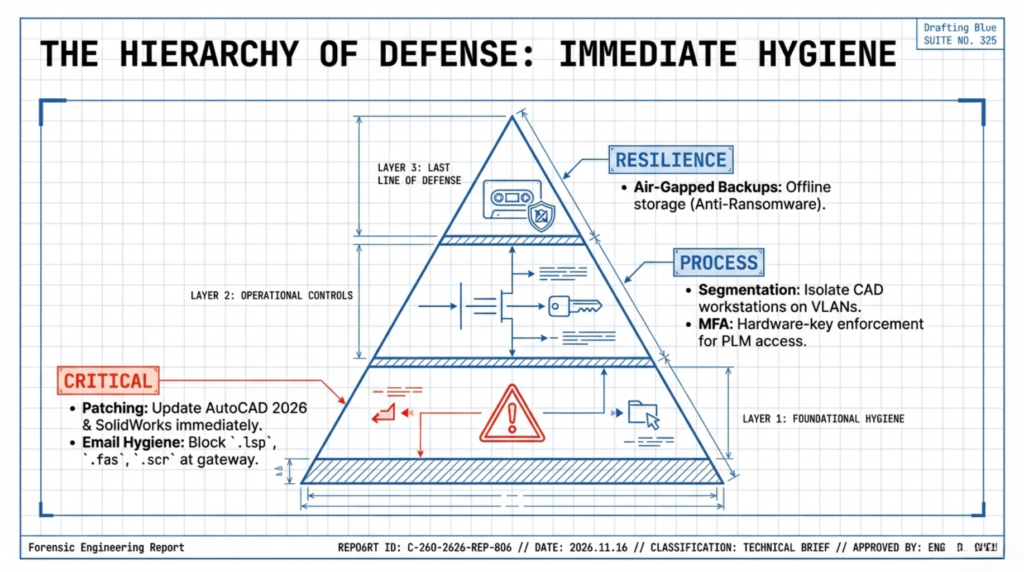
Patch all CAD software immediately. Autodesk released critical security updates for AutoCAD 2026 addressing multiple remote code execution vulnerabilities. Apply these patches across all workstations. Subscribe to security advisory mailing lists from CAD vendors to receive immediate notification of new vulnerabilities.
Implement email attachment scanning for CAD files. Configure email gateways to quarantine CAD files from external sources. Block potentially malicious file types like LSP and FAS files at the email perimeter. Require security review before engineers open CAD attachments from unknown senders.
Enable multi-factor authentication (MFA) everywhere. Require MFA for CAD software licenses, cloud storage, PLM systems, and VPN access. This simple control stops most account compromise attacks. Use hardware security keys for engineers with access to critical intellectual property.
Conduct CAD security awareness training. Engineers need specific training on CAD-targeted attacks. Show real examples of malicious CAD files, explain social engineering tactics targeting engineering departments, and teach recognition of suspicious file requests. Update training quarterly as threats evolve.
Audit CAD file access controls. Review who has access to sensitive design files. Implement least-privilege principles: engineers should only access files needed for current projects. Remove access immediately when employees leave or change roles.
Implement offline backups of CAD vaults. Maintain air-gapped backups of PDM/PLM systems that ransomware cannot encrypt. Test restoration procedures monthly. Document exact restoration steps including handling of broken file references and assembly relationships.
Encryption and Digital Rights Management
Deploy encryption for CAD files at rest and in transit. Use AES-256 encryption for stored CAD data. Autodesk and other vendors support native encryption for cloud storage. Enable TLS/SSL for all file transfers. Encrypt backup media.
Implement Digital Rights Management (DRM) for sensitive designs. DRM technology applies persistent encryption and access controls that follow files wherever they travel. Unlike perimeter security that protects only the network, DRM protects the files themselves.
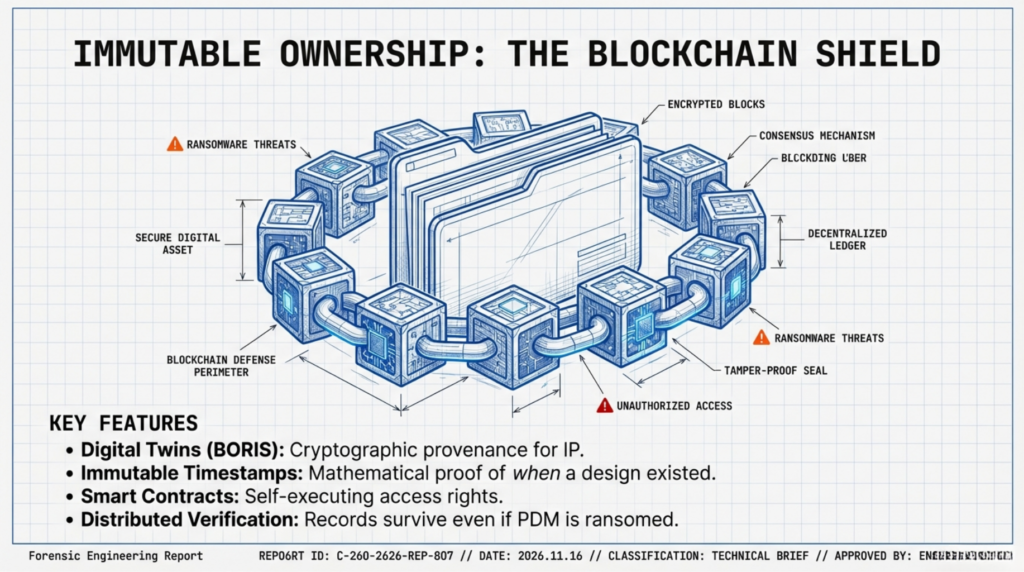
Violetta Bonenkamp, CEO and co-founder of CADChain, built her career addressing this exact challenge. Starting CADChain in 2019, she recognized that CAD designs and geometric data receive insufficient protection from traditional copyright and patent law. Her blockchain-based platform BORIS (Blockchain Ownership Rights Integration System) creates digital twins of CAD files and maintains cryptographic proof of ownership even when files are shared with external parties.
DRM solutions like Fasoo Enterprise DRM provide:
- Granular permissions controlling who can view, edit, print, or share files
- Real-time tracking showing exactly who accessed files and what actions they took
- Remote revocation capability to revoke access even after files were distributed
- Automatic encryption that persists regardless of file location
According to Autodesk’s 2025 security insights, manufacturers and engineers who fail to implement encryption and secure collaboration measures face 60% higher likelihood of financial loss from unauthorized access.
Network Segmentation and Access Control
Isolate CAD workstations on separate network segments. Engineering systems should operate on VLANs separate from general corporate networks. Implement zero-trust architecture requiring authentication for every connection. Restrict CAD workstation internet access to only essential sites and services.
Deploy application whitelisting. Allow only approved software to run on CAD workstations. This prevents malware execution even if users open malicious files. Maintain strict change management for adding new applications.
Implement file integrity monitoring. Deploy tools that detect unauthorized modifications to CAD files in PDM/PLM systems. Alert immediately when files change outside normal workflow processes. This helps catch both insider threats and ransomware before significant damage occurs.
Use Data Loss Prevention (DLP) systems. Monitor and control CAD file movements. Prevent engineers from emailing designs to personal accounts, uploading to unauthorized cloud storage, or copying to USB drives. Configure DLP to recognize CAD file formats including proprietary and neutral formats.
Metadata Sanitization
Strip sensitive metadata before sharing CAD files externally. Establish procedures for cleaning files before sending to suppliers, customers, or partners. Remove:
- Author information and user accounts
- Internal file paths and directory structures
- Revision history beyond what recipients need
- Custom properties containing confidential project details
- Comments and annotations
- Linked external references that reveal internal systems
CAD vendors provide metadata removal tools. AutoCAD includes PURGE and AUDIT commands. Third-party utilities offer automated metadata stripping. Incorporate metadata removal into standard operating procedures for external file sharing.
Create neutral format exports for external sharing. Convert native CAD formats to neutral formats like STEP, IGES, or STL when appropriate. These formats contain less metadata and reduce recipient dependency on specific CAD software. Neutral formats also prevent modification of your source models.
Blockchain-Based IP Protection
Dirk-Jan Bonenkamp, CLO and co-founder of CADChain, brings legal expertise to technical CAD protection challenges. His background bridging law and emerging technology led to CADChain’s unique approach using blockchain for immutable ownership records.
Blockchain technology provides:
Immutable timestamps proving design ownership. Cryptographic hashes of CAD files recorded on blockchain create tamper-proof evidence of when designs existed. This helps resolve IP disputes and prove prior art.
Audit trails tracking file access and changes. Every interaction with blockchain-protected files generates permanent records showing who accessed what, when, and what they did. This visibility helps detect unauthorized access and provides forensic evidence.
Smart contracts automating IP protection. Programmable smart contracts can enforce automatic licensing terms, royalty payments, or access restrictions without manual oversight. These self-executing agreements reduce administrative burden while improving compliance.
Distributed verification eliminating single points of failure. Blockchain’s distributed nature means no single system compromise can alter or destroy IP protection records. Even if your PDM system is ransomwared, blockchain records remain intact.
CADChain’s experience with 25+ employees implementing blockchain CAD protection since 2019 demonstrates real-world viability. Their BORIS plugin for Autodesk Inventor creates blockchain-backed digital twins while allowing engineers to work in familiar CAD environments.
AI-Powered Threat Detection
Deploy machine learning for anomaly detection. AI systems can identify suspicious CAD file access patterns that humans miss. Unusual file download volumes, after-hours access, or attempts to access files outside project assignments trigger alerts.
Use ML for malware detection in CAD files. Traditional antivirus solutions struggle with CAD-specific malware. Machine learning trained on CAD file characteristics achieves 99.49% detection rates for malicious AutoLISP scripts according to recent research. Specialized ML models recognize malicious file modifications, embedded scripts, and suspicious file structures.
Implement behavioral analysis on CAD workstations. Monitor processes running on engineering workstations for suspicious behavior. File encryption activities, unusual network connections, or privilege escalation attempts indicate potential compromise.
Compliance and Regulatory Considerations
CAD security increasingly intersects with regulatory compliance requirements. Engineering firms must address multiple frameworks depending on their industry and customers.
Export Controls: ITAR and EAR
CAD files containing defense-related technical data fall under International Traffic in Arms Regulations (ITAR) administered by the U.S. Department of State. Even Canadian firms serving U.S. defense contractors must comply. ITAR violations carry severe penalties including fines up to $1 million per violation and criminal prosecution.
Export Administration Regulations (EAR) govern dual-use technology that has both commercial and military applications. Many engineering products fall into EAR jurisdiction. CAD files classified as controlled technical data require licenses for export to certain countries.
Compliance requires:
- Classifying CAD files according to ITAR/EAR categories
- Implementing access controls restricting foreign nationals
- Encrypting controlled technical data
- Maintaining detailed audit logs of file access
- Training employees on export control requirements
- Conducting regular compliance audits
Data Protection: GDPR
CAD files may contain personal data triggering General Data Protection Regulation (GDPR) requirements. Author information, employee names in metadata, or customer details in design specifications constitute personal data under GDPR.
European engineering firms must:
- Document what personal data CAD files contain
- Establish legal basis for processing that data
- Implement appropriate technical and organizational measures
- Enable data subject rights including deletion requests
- Report data breaches within 72 hours
- Conduct Data Protection Impact Assessments for high-risk processing
GDPR fines reach up to €20 million or 4% of global annual turnover, whichever is higher.
Industry-Specific Standards
ISO 27001 information security management applies to engineering firms handling sensitive data. Certification demonstrates systematic approach to managing CAD file security risks.
SOC 2 compliance matters for cloud CAD platforms and SaaS providers. Type II reports verify security controls operate effectively over time.
NIST Cybersecurity Framework provides structured approach to managing CAD security risks. Government contractors often must demonstrate NIST compliance.
Sector-specific requirements:
- Aerospace: AS9100 quality management and CMMC for defense contractors
- Automotive: TISAX (Trusted Information Security Assessment Exchange) for suppliers
- Medical Devices: FDA regulations covering device master records and design history files
- Critical Infrastructure: Sector-specific cybersecurity requirements
CAD Security Mistakes Engineers Keep Making
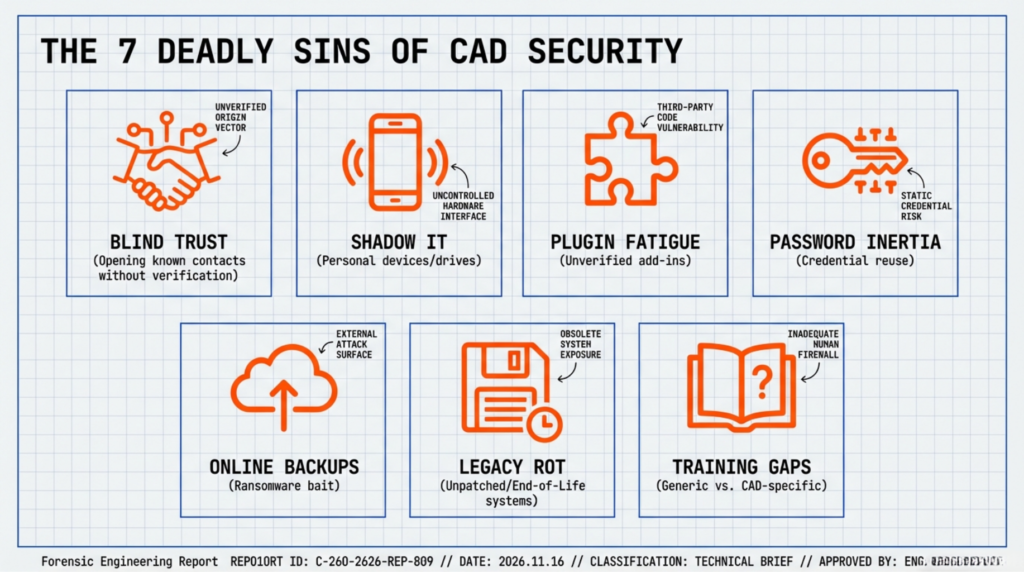
Even security-conscious engineering organizations fall into predictable traps. Recognizing these mistakes helps you avoid them.
Mistake 1: Trusting Files from Known Contacts
Engineers open CAD files from colleagues, suppliers, and clients without suspicion because they recognize the sender. Attackers exploit this trust through compromised email accounts. When your supplier’s email account is hacked, malicious files arrive from addresses you know and trust.
Fix: Implement “trust but verify” procedures. When receiving unexpected CAD files, confirm through separate communication channels (phone call, text message) before opening. Scan all CAD attachments regardless of sender.
Mistake 2: Using Personal Devices for Work CAD Files
Working from home blurs lines between personal and professional devices. Engineers copy CAD files to personal laptops, tablets, or cloud storage for convenience. These devices lack enterprise security controls and often run outdated software with unpatched vulnerabilities.
Fix: Provide company-owned workstations for CAD work. Prohibit CAD file storage on personal devices. Deploy Mobile Device Management (MDM) solutions if work on personal devices is unavoidable. Use virtual desktop infrastructure (VDI) to keep files on secure servers.
Mistake 3: Overlooking Vendor and Plugin Security
Engineering teams install CAD plugins, add-ins, and utilities from third-party developers without vetting security. These tools request broad permissions and often lack security audits. Compromised plugins become persistent backdoors.
Fix: Maintain approved software lists for CAD environments. Require security review before installing new plugins. Subscribe to vendor security advisories. Remove unused plugins and tools. Regularly audit installed software.
Mistake 4: Weak Password Practices
Default passwords, shared credentials, and reused passwords plague engineering departments. Engineers use simple passwords because complex ones are hard to remember. They share passwords for convenience when collaborating. They reuse passwords across systems because managing unique credentials is tedious.
Fix: Enforce strong password policies with minimum complexity requirements. Deploy password managers to generate and store unique credentials. Implement SSO (Single Sign-On) to reduce password fatigue. Require MFA on all CAD-related accounts.
Mistake 5: Neglecting Offline Backups
Organizations backup CAD data to network-attached storage or cloud services that remain connected to production systems. Ransomware encrypts these backups along with primary files, making recovery impossible without paying ransoms.
Fix: Maintain air-gapped backups physically disconnected from networks. Use offline tape backups or removable hard drives stored securely. Follow 3-2-1 backup rule: three copies, two different media types, one off-site. Test restoration procedures quarterly.
Mistake 6: Ignoring Legacy CAD Systems
Organizations continue running outdated CAD software because migration is expensive and disruptive. These legacy systems have known vulnerabilities and no longer receive security patches. They become easy targets for attackers.
Fix: Prioritize legacy system modernization in IT budgets. Isolate legacy systems on separate network segments with strict access controls if immediate migration is impossible. Implement compensating controls like application firewalls and enhanced monitoring.
Mistake 7: Insufficient Security Training
Generic cybersecurity training doesn’t address CAD-specific threats. Engineers don’t recognize malicious LSP files, metadata risks, or CAD-targeted social engineering because training doesn’t cover these scenarios.
Fix: Develop CAD-specific security training covering file format vulnerabilities, metadata risks, social engineering targeting engineers, and safe collaboration practices. Use real examples of CAD attacks. Make training mandatory quarterly with assessments.
Building a Comprehensive CAD Security Program
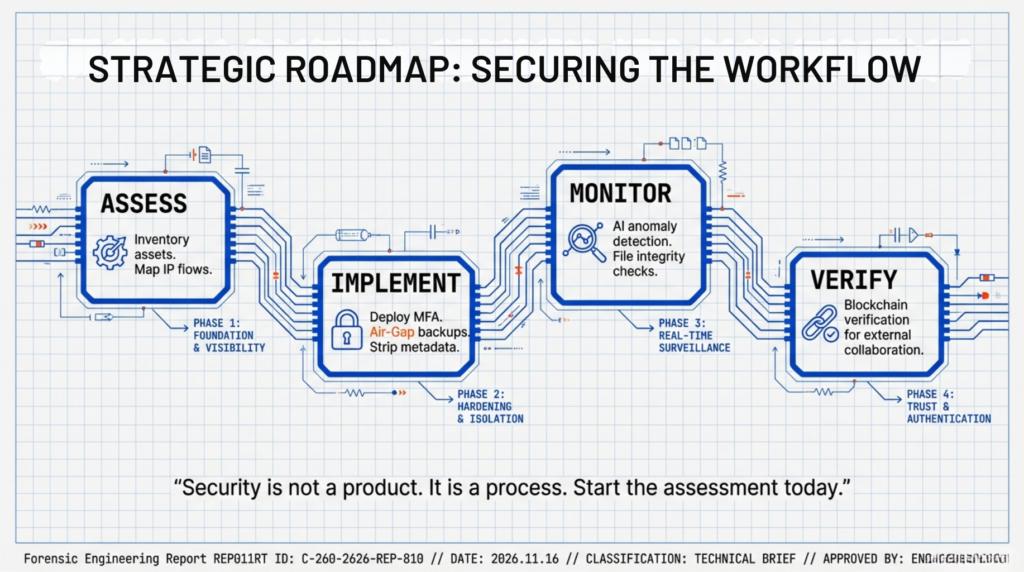
Protecting CAD files requires systematic programs addressing people, processes, and technology. One-off fixes don’t work; you need ongoing commitment.
Assess Your Current Risk Posture
Start with thorough risk assessment covering:
- Inventory all CAD systems, applications, and data repositories
- Identify where sensitive designs are stored, processed, and shared
- Map data flows showing how CAD files move through your organization and to external parties
- Catalog current security controls and identify gaps
- Evaluate compliance requirements applicable to your operations
- Assess historical security incidents and near-misses
Use frameworks like NIST Cybersecurity Framework or ISO 27001 to structure assessments. Engage third-party security firms for objective evaluations.
Develop Policies and Procedures
Document clear policies covering:
Acceptable use: What engineers can and cannot do with CAD files. Prohibit personal device storage, unauthorized sharing, and public cloud uploads.
Access control: Who gets access to what CAD data based on job roles and project assignments. Define approval processes for access requests.
Data classification: How to classify CAD files by sensitivity level. High-value IP receives stricter controls than general-purpose templates.
Incident response: Step-by-step procedures for responding to CAD security incidents. Define roles, escalation paths, and communication protocols.
Third-party management: Requirements for suppliers, contractors, and partners accessing CAD data. Include security requirements in contracts.
Training and awareness: Mandatory security training schedules, topics covered, and assessment methods.
Implement Technical Controls
Deploy layered security controls including:
- Perimeter security: Firewalls, intrusion detection/prevention systems, secure VPN access
- Endpoint protection: Anti-malware, EDR (Endpoint Detection and Response), application whitelisting
- Data protection: Encryption, DRM, DLP systems
- Access management: MFA, identity and access management systems, privileged access management
- Network security: Network segmentation, zero-trust architecture, micro-segmentation
- Monitoring: SIEM (Security Information and Event Management), log aggregation, threat intelligence
- Backup and recovery: Offline backups, tested restoration procedures, business continuity planning
Establish Continuous Monitoring
Security isn’t one-time because threats evolve constantly. Implement continuous monitoring covering:
- Real-time alerts for suspicious CAD file access patterns
- Automated vulnerability scanning of CAD workstations
- Threat intelligence feeds for CAD-specific attack campaigns
- Security metrics dashboards showing key risk indicators
- Regular penetration testing of CAD systems
- Ongoing security awareness phishing simulations
- Quarterly tabletop exercises simulating CAD ransomware scenarios
Measure and Improve
Track security program effectiveness through metrics:
- Incident metrics: Number of CAD security incidents, mean time to detect, mean time to respond
- Vulnerability metrics: Average time to patch critical vulnerabilities, number of unpatched systems
- Compliance metrics: Audit findings, regulatory violations, policy exceptions
- Training metrics: Percentage of engineers completing training, phishing simulation click rates
- Technical metrics: Encryption coverage percentage, systems with EDR deployed, MFA adoption rate
Review metrics quarterly. Conduct annual program assessments. Update policies and controls based on lessons learned and evolving threats.
CAD Security Statistics and Trends Table
| Security Metric | 2024 Data | 2025 Data | 2026 Projection | Source |
|---|---|---|---|---|
| Ransomware victims (globally) | 5,010 | 6,200 | 7,000+ | QBE Canada 2025 |
| Average data breach cost (Canada) | $6.32M CAD | $6.98M CAD | $7.5M CAD (est.) | IBM Cost of Data Breach 2025 |
| Manufacturing as most-attacked industry | #1 (Asia-Pacific, Europe) | #1 (maintained) | #1 (projected) | IBM X-Force 2024 |
| Canadian orgs experiencing cyberattacks | 82% | 86.5% | 90%+ (est.) | CDW Canada 2024 |
| High-severity cloud alerts increase | Baseline | +235% YoY | Continued growth | QBE Canada 2025 |
| Ransomware attacks (Q1) | 572 incidents | 1,537 incidents | 2,100+ (est.) | QBE Canada 2025 |
| Canadian businesses paying ransoms | 71% | 74% | 75%+ (est.) | CIRA Survey 2025 |
| Average ransom payment (Canada) | $22,000 | $25,000 | $28,000 (est.) | CIRA Survey 2025 |
| Global data in cloud storage | 43% | 50% | 55% (est.) | QBE Canada 2025 |
| Deepfake involvement in attacks | 7% | 10% | 15% (est.) | QBE Canada 2025 |
| Organizations with formal IR plans (Canada SMB) | 9% | 11% | 15% (est.) | Insurance Bureau of Canada 2025 |
The Future of CAD Security: What’s Coming
CAD security continues evolving as technology advances and threats become more sophisticated. Understanding emerging trends helps organizations prepare.
Quantum Computing Threats
Current encryption standards protecting CAD files will become vulnerable when practical quantum computers emerge. Post-quantum cryptography development races to stay ahead. Engineering firms should monitor NIST’s post-quantum cryptography standardization process and plan migration strategies.
CADChain and similar blockchain solutions will need quantum-resistant cryptographic algorithms to maintain long-term IP protection guarantees. The good news: awareness is growing and solutions are in development before quantum threats materialize.
AI-Driven Security Tools
Machine learning and AI will transform CAD security from reactive to predictive. AI systems will:
- Predict likely attack targets based on threat intelligence and organizational risk factors
- Automatically detect and respond to anomalies in real-time
- Generate synthetic training data to improve detection models
- Automate security policy enforcement and compliance checking
- Provide natural language interfaces for security investigations
However, attackers also leverage AI. The arms race between AI-powered defenses and AI-enabled attacks will intensify.
Zero-Trust Architecture Adoption
Zero-trust principles (never trust, always verify) will become standard for engineering networks. Traditional perimeter security fails in cloud-first, hybrid work environments. Zero-trust requires:
- Verifying every user, device, and application before granting access
- Implementing least-privilege access controls
- Assuming breach and limiting lateral movement
- Continuously monitoring and validating security posture
Engineering organizations will deploy software-defined perimeters, micro-segmentation, and identity-centric security models.
Convergence of IT and OT Security
As CAD-to-manufacturing connections deepen, information technology (IT) and operational technology (OT) security teams must collaborate. Historically separate domains with different priorities and tools need unified security strategies. Expect integrated security operations centers monitoring both IT and OT environments.
Manufacturing execution systems, industrial control systems, and robotics become part of the attack surface when connected to CAD systems. Security architectures must address both digital IP theft and physical safety risks.
Regulatory Expansion
Governments worldwide are expanding cybersecurity regulations. Canada’s proposed Bill C-26 aims to strengthen critical infrastructure cybersecurity. The EU’s NIS2 Directive broadens cybersecurity requirements across sectors. U.S. SEC rules now require public companies to disclose material cybersecurity incidents within four business days.
Engineering firms, especially those serving regulated industries or critical infrastructure, should anticipate increasing compliance burdens. Proactive security programs position organizations to meet future regulatory requirements without scrambling.
What are CAD file vulnerabilities and why do they matter?
CAD file vulnerabilities are security weaknesses in Computer-Aided Design software and file formats that attackers can exploit to compromise systems. These vulnerabilities matter because CAD files contain valuable intellectual property, proprietary designs, and trade secrets that represent the core competitive advantage for manufacturing and engineering companies. A single exploited vulnerability can lead to IP theft worth millions, ransomware attacks that halt production, or sabotaged designs that cause product failures. In 2026, with manufacturing identified as the most-attacked industry globally and ransomware incidents nearly tripling year-over-year, CAD file vulnerabilities represent critical business risks. Engineers often overlook these risks because CAD software seems specialized and technical, but attackers actively target these systems because they contain the most valuable data in engineering organizations. Understanding CAD vulnerabilities helps companies protect their most important assets: the designs that differentiate them in the marketplace.
How do attackers actually exploit CAD file vulnerabilities?
Attackers exploit CAD file vulnerabilities primarily through social engineering combined with technical exploitation. The process typically begins with a phishing email or compromised supplier communication delivering a malicious CAD file disguised as a legitimate design, update, or specification. When an engineer opens this file in AutoCAD, SOLIDWORKS, or another CAD application, parsing vulnerabilities trigger. These vulnerabilities (out-of-bounds writes, heap overflows, use-after-free conditions, or uninitialized variables) allow attackers to corrupt memory and execute arbitrary code within the CAD application’s context. This code execution provides attackers with the same privileges as the CAD software, typically allowing them to read files, install malware, establish persistent access, or move laterally across networks. Many exploits target specific file formats like MODEL, CATPART, EPRT, or LSP files that have documented vulnerabilities. The attack chain unfolds rapidly once the file opens, often before security systems detect suspicious behavior. Critical success factors for attackers include convincing social engineering to get engineers to open files, exploiting zero-day vulnerabilities before patches are available, and targeting specific CAD software versions that organizations haven’t updated. Defense requires both preventing malicious files from reaching engineers and hardening CAD workstations to limit damage if exploitation occurs.
What specific CAD file formats are most vulnerable to attacks in 2026?
Multiple CAD file formats carry documented vulnerabilities actively exploited in 2026. AutoCAD MODEL files face critical vulnerabilities (CVE-2026-0875, ZDI-26-107) allowing out-of-bounds write conditions that enable remote code execution. CATPART files used by CATIA and read by AutoCAD have similar issues (ZDI-26-106, CVE-2025-1428). CATPRODUCT files contain uninitialized variable vulnerabilities (CVE-2025-1427, CVE-2025-1649, CVE-2025-1650). SOLIDWORKS EPRT files processed by eDrawings suffer from memory corruption and use-of-uninitialized-variable flaws (CVE-2026-1335, CVE-2026-1333) allowing arbitrary code execution. PRT files in Autodesk Shared Components trigger out-of-bounds read vulnerabilities (CVE-2025-9453). AutoLISP script files (LSP and FAS) serve as malware delivery mechanisms, embedding malicious payloads that execute within AutoCAD environments while often bypassing antivirus detection. SLDPRT files have memory corruption vulnerabilities (CVE-2025-1430), and 3DM files contain use-after-free vulnerabilities (CVE-2025-1432). The common thread across these formats is inadequate input validation during file parsing; CAD applications fail to properly validate user-supplied data before processing it, creating opportunities for attackers to trigger memory corruption and gain code execution. Organizations should treat these file formats from external sources as potentially malicious, implementing scanning, sandboxing, and user awareness training specific to these formats. Native CAD formats generally carry more vulnerability risk than neutral formats like STEP or IGES because native formats contain more complex data structures and application-specific features that create larger attack surfaces.
How can engineering organizations detect CAD security breaches?
Detecting CAD security breaches requires combining behavioral analytics, network monitoring, and endpoint detection capabilities specifically tuned for engineering environments. Key detection methods include monitoring unusual CAD file access patterns: employees accessing files outside their normal project assignments, bulk downloads of design libraries, or after-hours access from unusual locations all indicate potential compromise. File integrity monitoring detects unauthorized modifications to CAD files in PDM or PLM systems, alerting when files change outside normal workflow processes. Network traffic analysis identifies suspicious outbound connections from CAD workstations, particularly large data transfers to unusual destinations that might indicate IP exfiltration. Endpoint Detection and Response (EDR) solutions track processes running on engineering workstations, flagging suspicious behaviors like file encryption activities, privilege escalation attempts, or execution of unknown binaries. User and Entity Behavior Analytics (UEBA) systems establish baseline behavior for each engineer and alert when activities deviate significantly, such as a mechanical engineer suddenly accessing electrical design files or downloading 10x their normal file volume. Email security solutions analyze attachments for malicious CAD files before they reach engineers’ inboxes, using both signature-based detection and machine learning to identify threats. Security Information and Event Management (SIEM) systems correlate events across multiple sources to detect attack patterns that individual tools might miss. Organizations should also implement honeypot CAD files, attractive-seeming but fake design files with monitoring that immediately alerts when accessed, providing early warning of insider threats or compromised accounts. Detection effectiveness improves with CAD-specific tuning; generic security tools miss engineering-specific indicators, so customize detection rules for your CAD environment. Regular tabletop exercises help security teams understand what CAD breach scenarios look like and practice response procedures before real incidents occur.
What immediate steps should I take if I suspect a CAD file is malicious?
If you suspect a CAD file might be malicious, take immediate containment actions before investigating further. First, do not open or interact with the suspicious file, even previewing files can trigger some exploits. Disconnect the workstation from the network immediately to prevent potential malware from spreading laterally or exfiltrating data. If the file is already open, power off the workstation rather than performing a normal shutdown, which might give malware time to cover tracks. Alert your IT security team or incident response contact immediately as faster escalation improves containment outcomes. Preserve the suspicious file and any related emails or communications as evidence, but store them in quarantined locations that prevent accidental execution. Document everything you observed: who sent the file, how it arrived, what made it suspicious, and any unusual system behaviors. Change passwords for any accounts accessed from the potentially compromised workstation, particularly CAD software licenses, PLM system credentials, and network accounts. IT teams should isolate the workstation for forensic analysis, collecting memory dumps and disk images before the system is reimaged. Scan backup systems to ensure malware hasn’t spread to backup repositories. Review access logs to determine what files the potentially compromised account accessed recently. Check for signs of lateral movement: other workstations accessed from the compromised system or unusual network connections. Notify stakeholders if sensitive designs might have been accessed, as breach notification requirements may apply. For high-value incidents, consider engaging specialized incident response firms with experience in manufacturing IP theft cases. After containment, conduct root cause analysis to understand how the malicious file bypassed security controls and implement improvements to prevent recurrence. Communication is critical as hiding potential breaches from security teams allows damage to compound.
How does blockchain technology protect CAD files from security threats?
Blockchain technology protects CAD files through immutable record-keeping, cryptographic verification, and decentralized trust models that traditional security approaches cannot match. When CAD files are registered on blockchain platforms like CADChain’s BORIS system, cryptographic hashes (unique digital fingerprints) of file contents are recorded on distributed ledgers. These hash records prove exactly when specific design versions existed, creating tamper-proof timestamps that resolve IP ownership disputes and establish prior art. Any modification to file contents changes the hash, immediately revealing tampering attempts. Blockchain’s distributed nature means no single system compromise can alter or destroy these protection records, even if ransomware encrypts your PDM system, blockchain records remain intact on nodes worldwide. Smart contracts automate IP protection policies without human intervention, enforcing licensing terms, access restrictions, or royalty payments through self-executing code that cannot be bypassed. Every interaction with blockchain-protected files generates permanent audit trails showing who accessed what, when, and what actions they took. This visibility helps detect unauthorized access patterns and provides forensic evidence for investigations. Unlike traditional access control systems that attackers can disable or manipulate once they compromise administrative accounts, blockchain access records cannot be retroactively altered: what happened stays in the permanent record. Blockchain also enables secure collaboration with external parties by cryptographically proving file authenticity and tracking usage without requiring mutual trust. Suppliers, contract manufacturers, and clients can verify files came from legitimate sources and haven’t been tampered with during transmission. CADChain’s implementation specifically addresses CAD challenges by maintaining file usability: engineers continue working in familiar CAD environments while blockchain protection operates transparently in the background. The technology creates digital twins of CAD files on the blockchain, separating ownership proof from file utility. This approach recognizes that heavy cryptographic protection rendering files unusable defeats the purpose, since engineering requires active collaboration. Integration with existing CAD workflows remains crucial for adoption: standalone security solutions that disrupt normal work processes face resistance from engineering teams. Blockchain complements rather than replaces traditional security controls, adding an immutable proof layer that attackers cannot compromise even with system-level access.
What role does metadata play in CAD file security risks?
Metadata in CAD files creates significant but often overlooked security risks because it contains sensitive information beyond visible geometry that organizations frequently fail to protect. CAD metadata includes author names revealing key engineers attackers might target for social engineering, file paths exposing internal network structures that aid reconnaissance, timestamps indicating work schedules and project deadlines that attackers can exploit for timing attacks, custom properties containing project codes and customer names that leak business relationships, revision histories showing design evolution that represents valuable competitive intelligence, linked external references that reveal technology stacks and file dependencies, material specifications and manufacturing processes that constitute trade secrets, and comments or annotations containing engineering rationale that exposes decision-making. This metadata enables attackers to map organizational structures, identify valuable intellectual property, and craft sophisticated targeted attacks using specific terminology and project references. For example, file paths like “C:\Projects\CustomerX\SecretProject\Prototype_v7” immediately tell attackers which designs matter most. Author metadata “John.Smith@company.com” identifies an engineer to impersonate in phishing attacks. Timestamps showing files modified at 2 AM suggest tight deadlines when engineers might be more susceptible to urgency-based social engineering. Custom properties containing customer part numbers reveal business relationships companies might prefer to keep confidential. Engineers rarely think about metadata risks because it’s invisible during normal work: they focus on geometry and design intent, not background file properties. Yet this information persists when files are shared with suppliers, customers, or partners, effectively broadcasting internal details to external parties. Metadata leakage becomes especially problematic when organizations share files with contract manufacturers who might serve competitors. Even when geometry is protected through neutral format exports, rich metadata in original files can reveal manufacturing processes, material choices, and cost structures. Organizations should implement metadata sanitization procedures before external file sharing, using tools to strip author information, internal paths, revision history beyond what recipients need, custom properties containing confidential details, and comments or annotations. Creating neutral format exports (STEP, IGES, STL) removes much metadata automatically while maintaining geometric information necessary for manufacturing. Some PLM systems offer automated metadata removal during export workflows. Training engineers about metadata risks is essential since they control file sharing decisions: security teams can provide tools, but engineers must understand when and why to use them. Regular audits of files sent externally can identify metadata leakage patterns and improve processes. Remember that metadata protection complements geometric IP protection: both dimensions require attention for comprehensive CAD security.
How effective are traditional antivirus solutions against CAD malware?
Traditional antivirus solutions provide incomplete protection against CAD malware and increasingly fail to detect sophisticated CAD-targeted attacks in 2026. Signature-based antivirus relies on matching files against databases of known malware signatures, but CAD attacks frequently use zero-day vulnerabilities exploiting previously unknown flaws that have no signatures. By the time signatures are added, attacks have already succeeded. CAD-specific malware like AutoLISP scripts embedded in LSP and FAS files often bypass signature detection because antivirus vendors don’t maintain comprehensive signature databases for CAD scripting languages: these file types are specialized and less common than Windows executables or Office macros that receive more attention. Research published in December 2024 demonstrated that while antivirus solutions detect many malicious CAD files, significant opportunities remain to enhance protection through specialized machine learning approaches. The study analyzed 6,418 LSP files and achieved 99.49% true positive detection rates using knowledge-based feature extraction tailored specifically for AutoLISP malware, substantially better than generic antivirus performance. Polymorphic malware that changes its signature with each infection evades signature detection entirely. Fileless attacks that exploit CAD vulnerabilities without writing malware to disk leave nothing for file-scanning antivirus to detect. Memory-resident malware operating entirely in RAM bypasses traditional on-disk scanning. The increasing use of legitimate CAD files weaponized with embedded exploits creates additional detection challenges: the file appears legitimate and might even be signed with valid vendor certificates, yet triggers vulnerabilities when processed. Antivirus solutions also struggle with the large binary sizes of CAD files: scanning gigabyte-sized assemblies impacts system performance so heavily that engineers often disable real-time scanning on CAD workstations. Behavioral detection represents an improvement over signature-based approaches, monitoring programs for malicious behaviors rather than known signatures. However, CAD applications perform many unusual behaviors during normal operation (complex memory manipulation, extensive file system access, network connections to license servers) that make establishing clean behavioral baselines difficult. Despite these limitations, antivirus remains a valuable component of layered defense strategies as it catches opportunistic attacks and common malware. The key is not relying exclusively on antivirus but combining it with specialized protections: endpoint detection and response (EDR) solutions that provide deeper visibility into system behaviors, application whitelisting that only allows approved software to run, CAD-specific malware detection using machine learning trained on engineering file characteristics, network segmentation limiting CAD workstation communication, and user awareness training that helps engineers recognize social engineering attempts delivering malicious files. Organizations serious about CAD security should deploy multiple overlapping controls rather than depending on any single technology. Assume traditional antivirus provides baseline protection for commodity threats but recognize it won’t stop targeted attacks against CAD systems. Invest in specialized security capabilities tuned for engineering environments.
What training should engineering teams receive about CAD security?
Engineering teams require specialized security training addressing CAD-specific threats that generic cybersecurity training doesn’t cover. Effective CAD security training should include recognition of CAD-targeted phishing attacks that impersonate suppliers, customers, or colleagues requesting design reviews or sending updated specifications, teaching engineers to verify unexpected file requests through separate communication channels before opening attachments. Training must demonstrate actual malicious CAD files and exploitation techniques so engineers understand threats are real and sophisticated, not theoretical. Cover the specific file formats that carry highest vulnerability risk (MODEL, CATPART, EPRT, LSP/FAS files) and explain why files from even trusted sources require caution once email accounts or supplier systems are compromised. Explain metadata risks comprehensively: engineers need to understand what information CAD files contain beyond visible geometry and why that metadata matters for security. Provide hands-on practice with metadata removal tools and neutral format exports so engineers know how to sanitize files before external sharing. Teach secure collaboration practices for working with external partners: using designated file sharing platforms with access controls rather than email attachments, applying appropriate access permissions to shared files, verifying recipient identities before granting access, and setting expiration dates for external access to time-sensitive designs. Address insider threat indicators without creating hostile environments: engineers should understand that monitoring unusual access patterns protects everyone, not implies distrust. Cover physical security practices: locking CAD workstations when leaving desks, not copying files to personal devices or unauthorized cloud storage, reporting lost or stolen devices containing CAD access immediately, and disposing of design documentation securely. Explain ransomware specifically as it relates to CAD environments: how ransomware targets PDM/PLM systems, why connected backups don’t protect against it, signs of potential ransomware infection, and immediate actions to take if ransomware is suspected. Provide password and authentication security training focused on CAD applications: using strong unique passwords, not sharing credentials even with colleagues, enabling multi-factor authentication on CAD licenses and PLM access, and using company-provided password managers. Create scenario-based exercises where engineers practice identifying suspicious situations: unexpected CAD file attachments from suppliers, urgent requests to review designs outside normal projects, technical support calls requesting CAD credentials, or unusual system behaviors after opening files. Make training interactive and engaging rather than passive lecture formats as people retain more from active participation. Use real examples from your industry and company where possible because engineers take threats more seriously when seeing concrete examples rather than abstract warnings. Schedule training quarterly at minimum since threat landscapes evolve rapidly. Measure effectiveness through phishing simulations specifically using CAD file attachments, observing whether click rates decrease after training. Provide quick-reference guides engineers can consult during work rather than expecting perfect retention of training content. Include role-specific training for different positions: senior engineers with access to most valuable IP receive more intensive training, new engineers receive comprehensive onboarding covering all security policies, managers learn to recognize and escalate security concerns, and administrators receive technical security control training. Consider bringing in external speakers including penetration testers who have attacked CAD systems, law enforcement discussing IP theft cases, or representatives from companies that experienced breaches discussing lessons learned. Real-world perspectives resonate more than hypothetical scenarios. Provide clear reporting channels for security concerns and celebrate engineers who report suspicious files or potential incidents as positive reinforcement increases reporting rather than creating fear of blame for mistakes. Make Violetta Bonenkamp and Dirk-Jan Bonenkamp from CADChain available to share their experiences building blockchain IP protection solutions, providing insights into what motivated the company’s founding and what vulnerabilities they’ve witnessed firsthand in manufacturing organizations. Insider perspectives from security practitioners who understand engineering workflows provide credibility that generic security trainers cannot match.
How should organizations respond to a confirmed CAD file security breach?
Responding effectively to confirmed CAD file security breaches requires structured incident response procedures executed rapidly to minimize damage. Immediate containment actions include isolating compromised workstations from the network to prevent malware spread and data exfiltration, changing all passwords for accounts that were accessed from compromised systems particularly CAD software licenses and PLM credentials, disabling compromised user accounts until investigation completes, and taking forensic images of affected systems before remediation begins to preserve evidence. Activate your incident response team including IT security personnel, CAD system administrators, legal counsel for breach notification guidance, senior engineering leadership to assess IP exposure, and potentially external incident response firms if internal capabilities are insufficient. Conduct rapid damage assessment determining which CAD files were accessed or exfiltrated by checking PLM access logs and reviewing network traffic logs for large outbound data transfers. Identify the attack vector to prevent reinfection: was it a phishing email, compromised supplier portal, vulnerable plugin, or insider threat? Analyzing the initial compromise method guides remediation efforts. Implement enhanced monitoring on systems that might have been affected to catch signs of persistence mechanisms or lateral movement attempts. For ransomware specifically, do NOT immediately pay ransoms; consult with legal counsel and law enforcement about reporting requirements and response options, assess backup availability and restoration feasibility, calculate business impact of prolonged downtime versus ransom payment, and engage ransomware negotiation specialists if needed. Notify stakeholders according to legal requirements and contractual obligations: breach notification laws in many jurisdictions require disclosure within specific timeframes (72 hours under GDPR, 4 business days for SEC-reporting companies), customer contracts may contain breach notification clauses requiring immediate disclosure, insurance providers need prompt notification to maintain coverage, and affected employees whose data was compromised require notification. Communicate carefully with customers and partners whose data or files might have been exposed, balancing transparency with legal liability considerations: consult counsel before external communications. Conduct thorough investigation including reviewing all access logs from compromised accounts for the weeks preceding detection, examining what files were accessed and whether they were downloaded or modified, analyzing malware samples to understand capabilities and likely objectives, checking for signs the attacker maintained persistent access through backdoors or compromised accounts, and determining whether other systems beyond initially identified ones were compromised. Document everything meticulously as you’ll need detailed records for insurance claims, regulatory filings, law enforcement cooperation, and internal post-incident reviews. Begin remediation by patching vulnerabilities that were exploited, removing malware and backdoors, rebuilding compromised systems from clean images rather than trying to clean infected systems, restoring files from backups after verifying backups are not also compromised, implementing additional security controls to prevent recurrence, and monitoring cleaned systems closely for several weeks to confirm attackers are fully evicted. Conduct post-incident review after containment analyzing what went wrong, why security controls failed to prevent or detect the breach earlier, what could be done better in future incidents, and what improvements to security posture are needed. Share lessons learned with engineering staff appropriately: balance transparency about what happened with not creating panic or providing attackers with detailed information about your security gaps. Update incident response plans based on lessons learned since every real incident reveals weaknesses in plans. Consider external breach coaches and forensic firms for serious incidents as their expertise improves outcomes and their involvement can protect communications under legal privilege. Report incidents to law enforcement particularly for nation-state attacks or organized crime as authorities track campaigns across multiple victims and sharing information helps protect broader communities. Maintain perspective that breaches happen to well-defended organizations; focus on rapid effective response and learning rather than blame assignment that discourages reporting and slows response. Build resilience rather than pursuing impossible perfect prevention since determined attackers eventually succeed against any defense. Having strong detection and response capabilities matters more than preventing every possible attack.