CAD File Access Control: Permission Systems For Engineering Teams
CAD file access control defines who is allowed to open, edit, export, print, download, reshare or retire sensitive design files. For engineering teams, the goal is not only to block outsiders. The goal is to keep each design file under the right level of control as it moves through design, review, supplier collaboration and production handoff.
Summary
CAD access control should be built around files, actions and evidence. A useful model starts with a sensitive-file inventory, assigns named users to clear roles, limits risky actions such as export and print, reviews partner access by date and purpose, and keeps audit records that support ownership, compliance and dispute response.
Simple folder permissions are rarely enough for CAD work. Engineering files move through native CAD tools, PLM systems, cloud drives, supplier portals, neutral exports, drawings, screenshots and manufacturing packages. A strong permission model separates viewing from editing, editing from approving, approving from exporting and exporting from resharing.
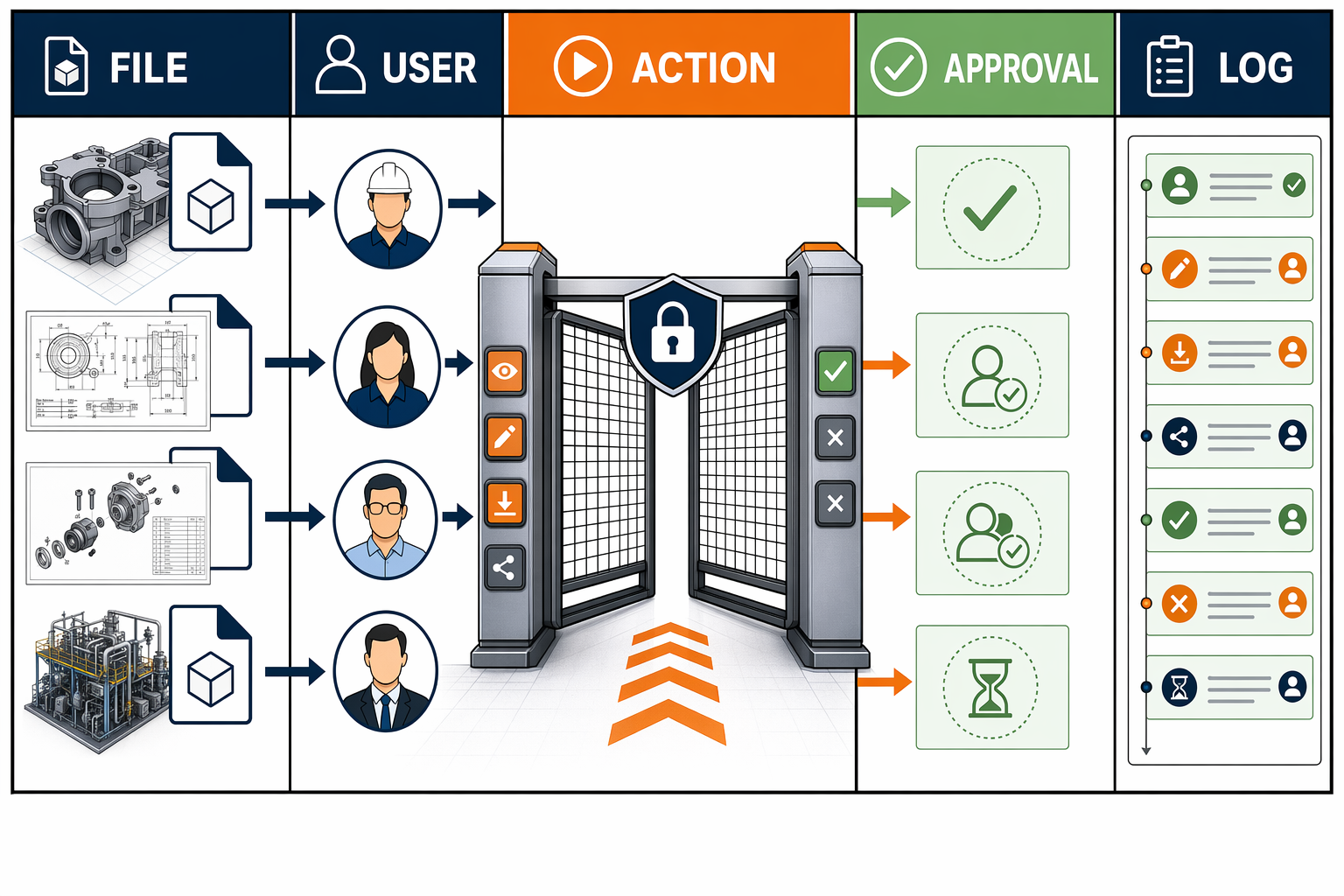
Access control is strongest when each CAD action connects a named user, a permitted file, an approved purpose and a durable log.
Why Access Control Matters For CAD Files
CAD files hold much more than geometry. A native model may include feature history, material choices, tolerances, configurations, embedded references, linked drawings, metadata and design decisions that reveal how a product is made. Even a neutral export may carry enough detail for a supplier, competitor or former employee to reproduce a part.
That makes access control a central part of CAD file security. Encryption protects data when it is stored or transferred. Rights management limits what an authorized person does after opening a file. Access control sits between those layers. It decides who gets into the file, from which context and for which actions.
The weakest CAD access models treat all authorized users as equal. A senior designer, junior reviewer, supplier estimator and contract manufacturer rarely need the same file rights. If each of them receives the same folder link, the company has a convenience model rather than a protection model.
The practical goal
The practical goal is to make the approved action easy and the risky action controlled. A reviewer should see the model. A supplier should receive only the manufacturing package required for the work. A quality lead should access the drawing and change record. A departing employee should lose access before local copies and shared links become a problem.
Good access control also improves response time. When a sensitive file is leaked, copied or disputed, the first questions are straightforward: who had access, what actions were allowed, when access started, when access ended and what record proves it. Teams that answer those questions from memory usually struggle. Teams that design access control around evidence have a stronger position.
Build The Permission Model Around The File
Many organizations start access control from teams and folders. That is useful for administration, but it is too broad for high-value CAD files. The safer starting point is the file or file group: which design assets are sensitive, why they matter, who needs them and which actions are justified.
A useful CAD permission model has five parts:
1. File sensitivity
Rank files by business damage if exposed. Production-ready assemblies, tooling designs, unreleased products, medical-device designs, aerospace drawings and patent-supporting records usually need tighter controls than early sketches.
2. Named identity
Use named accounts instead of shared logins. Shared supplier accounts make it difficult to prove who opened, downloaded or exported a file.
3. Work role
Separate designer, reviewer, approver, supplier, manufacturer, quality lead, legal reviewer and auditor roles. The role should describe the work being done, not only the department.
4. Allowed action
Define the allowed action clearly: view, comment, edit, approve, export, print, download, reshare, archive or revoke. Viewing and exporting should not be bundled together by default.
5. Evidence record
Keep the decision, timestamp and access log. The record should show why access was granted and when it ended.
6. Review trigger
Set a review trigger for design release, supplier handoff, employee exit, contract end, audit request or patent filing. Access that never expires becomes unmanaged exposure.
This model aligns with attribute-based access control concepts: authorization decisions consider subject attributes, object attributes, requested operations and environmental conditions. In CAD terms, that means the decision should consider the user, the file, the requested action and context such as device, location, contract phase or expiry date.
Permission Levels Engineering Teams Actually Need
Generic permission labels like owner, editor and viewer are often too rough for CAD work. Engineering teams need a clearer action model because each action carries different risk. The permission levels below are a practical starting point.
Discover
The user sees that a file exists, but cannot open the model. This is useful for catalogue searches, request flows and cross-team visibility without exposing geometry.
View
The user opens a controlled viewer or read-only file. For many reviewers, this is enough. View permission should not automatically include native download.
Comment
The user adds review notes without altering geometry. This is important for design review, quality feedback and legal comments.
Edit
The user modifies the model, drawing or assembly. Edit access should normally be limited to the active design owner or a small engineering group.
Approve
The user signs off a design release, drawing package, supplier package or manufacturing handoff. Approval should be logged separately from edit activity.
Export
The user creates STEP, STL, OBJ, PDF, DXF, DWG or other downstream files. Export deserves separate control because it often creates the easiest file to share outside the company.
The user prints drawings or physical reference documents. Print activity matters when paper drawings, photos and shop-floor packets are part of the workflow.
Reshare
The user sends the file or a link to another person. This should be restricted, logged and reviewed because reshare rights often create the widest exposure.
These levels also help teams compare access control with DRM and IRM for CAD. Access control asks who enters. DRM and IRM ask what continues to happen after entry. Teams need both concepts when sensitive CAD files leave the original system boundary.
A strong model also separates native CAD files from derivative files. A supplier may need a STEP file for quoting, a PDF drawing for tolerance review and a limited manufacturing packet for production. That does not mean the supplier needs the native assembly, design tree or all related files.
Evidence And Audit Logs Turn Permissions Into Proof
Access control without records is only a current-state setting. The value rises when the team can show what access existed at a specific point in time. That is why audit logs, timestamps, file hashes and approval records matter for sensitive CAD work.
At a minimum, the record should show:
- which file or file package was controlled;
- which user received access;
- which role and action rights were granted;
- who approved the access;
- when access started and ended;
- which exports or downloads occurred;
- which version or file hash was involved;
- which exception, if any, was allowed.
For high-value designs, access control should connect to ownership proof. File hashes, timestamps and review records help show that a specific design file existed at a specific time. That connects access governance with the broader CAD protection roadmap.
The record does not need to be complicated to be useful. A smaller company may begin with a structured access review, named accounts, change logs and file fingerprints. A larger company may integrate PLM, identity management, rights control, SIEM monitoring and blockchain certificates. The important point is continuity: the access decision, the file and the evidence should point to the same design asset.
CAD File Access Control Checklist
Use this checklist before giving a new person, supplier or system access to sensitive CAD files. For a wider review, use the CAD security checklist.
- The file group has a named owner.
- The business impact of exposure is understood.
- The user has a named account.
- The user role is tied to actual work.
- View rights are separated from download rights.
- Edit rights are limited to the active design group.
- Export rights require a clear reason.
- Print rights are handled as a separate action.
- External access has an expiry date.
- Supplier packages exclude unnecessary files.
- Metadata is reviewed before sharing.
- Approval is recorded before release.
- Access logs are retained.
- File versions are linked to access records.
- Departing users lose access promptly.
- Emergency access is reviewed afterward.
The checklist is intentionally action-based. A team that knows who can view, edit, export, print and reshare sensitive CAD files is in a stronger position than a team that only knows which folder a user belongs to.
Common CAD Access Control Mistakes
Using shared supplier accounts
A shared supplier login hides the actual person behind an action. It weakens audit quality and makes revocation harder when one supplier employee leaves.
Treating download as view
Opening a controlled viewer is different from downloading a native model. Downloaded files are harder to control, especially when local copies, email and unmanaged drives are involved.
Leaving old access active
Old supplier access, old employee access and old review links create quiet exposure. Access review should follow release milestones and contract events.
Ignoring derivative files
STEP, STL, OBJ, PDF, DXF and drawing packages may expose the same IP as the native model. Access control should cover derivatives, not only the master file.
Skipping export approval
Export is often the moment where control leaves the CAD or PLM environment. Export rights should be explicit and logged.
Keeping permissions separate from evidence
When access rules and proof records live in disconnected places, the team has to reconstruct events later. Connect the access decision, file version and evidence record early.
How CADChain Fits Into Access Control
CADChain focuses on protection records around engineering design assets: file fingerprints, timestamps, evidence trails and proof that a design existed before a dispute or handoff. That does not replace access control. It strengthens the record around it.
A practical sequence is to identify sensitive files, tighten access rules, limit risky actions, record ownership evidence and review logs over time. The access model shows who had permission. The evidence model helps show what file was involved and when the important record was created.
If a team is already comparing CAD file encryption, rights management and proof records, access control should be the connecting layer. It clarifies who receives the file, what they are allowed to do and what proof exists if a question appears later.
Related reading
Start with the CAD file security guide, then compare DRM and IRM for CAD, review common CAD file vulnerabilities and use the CAD security checklist to find access gaps.
Standards Notes
CAD access control is a domain-specific application of broader security principles. NIST SP 800-53 includes an Access Control family for account management, least privilege, remote access and related safeguards. NIST SP 800-162 explains attribute-based access control, where authorization is based on attributes of the user, object, action and context. NIST SP 800-207 explains zero trust architecture, which avoids implicit trust based only on location or network position.
Questions
What is CAD file access control?
CAD file access control is the set of permissions that decides who may open, edit, export, print, download, approve, archive or reshare design files.
Is folder permission enough for CAD files?
Folder permission is a start, but it is usually too broad. Sensitive CAD work needs action-specific rules for view, edit, export, print and reshare activity.
How is access control different from encryption?
Encryption protects data while it is stored or transferred. Access control decides who receives permission to use the file and which actions are allowed.
How is access control different from DRM or IRM?
Access control decides who enters. DRM and IRM help control what authorized users do after access, such as printing, copying or forwarding.
Which CAD file actions should be controlled?
At minimum, control view, comment, edit, approve, export, print, download and reshare actions. Export and reshare usually deserve the strictest review.
Should suppliers get native CAD files?
Only when native files are required for the approved work. Many supplier tasks work with a reduced package, neutral export, drawing or manufacturing file.
Why are shared supplier accounts risky?
Shared accounts hide the person behind each action. They make audit review, revocation and dispute response weaker.
What is least privilege for CAD files?
Least privilege means each person receives only the files and actions needed for the approved work, for the required time window.
How often should CAD access be reviewed?
Review access at design release, supplier handoff, contract close, employee exit, audit request and patent filing. High-value files deserve scheduled review too.
Should export rights be separate from edit rights?
Yes. A person may need to edit a model inside the controlled environment without needing permission to create downstream files.
Should print rights be separate from view rights?
Yes. Printed drawings and shop-floor packets are separate copies. They should be controlled when the drawing contains sensitive design information.
Do STEP and STL files need access control?
Yes. Neutral exports and 3D printing files may expose enough geometry for manufacturing or reverse engineering, even without native CAD history.
What logs matter for CAD access?
Useful logs show user identity, file version, action, timestamp, approval, export activity, download activity and revocation history.
How does access control help in disputes?
It helps show who had permission, which file version was involved and what actions were allowed at a specific time.
What is attribute-based access control?
Attribute-based access control uses information about the user, file, requested action and context to make permission decisions.
Does zero trust apply to CAD files?
Yes. Zero trust principles fit CAD work because trust should not depend only on office network location or company device ownership.
How should employee exits be handled?
Remove access promptly, review recent downloads and exports, disable shared links and confirm supplier or partner access is not tied to that user.
Should access vary by design phase?
Yes. Concept work, design review, release, supplier handoff and production support often need different user groups and actions.
How does CADChain support access evidence?
CADChain focuses on file fingerprints, timestamps and evidence trails that strengthen the record around important design assets.
Where should teams start?
Start with the most valuable design files, list who has access today, separate view from export rights and record the next review date.