
Factors in choosing integrated CAD/CAM software: the short answer
The factors that matter most when choosing integrated CAD/CAM software are whether it machines your parts, posts reliable code for your actual machines, and handles design changes without silent errors. After that come CAD and PDM fit, five-year cost, data location and local support. Integrated CAD/CAM suits teams that design and machine their own parts and revise them often. Shops that program from customer files in many CAD formats are often better served by CAD-neutral CAM.
To use this page:
- Copy the weighted scorecard below.
- Adjust the weights to match how your shop works.
- Shortlist two or three candidates.
- Run the benchmark-part trial on each one.
- Score from what you saw on your own machines, not from the demo.
Most pages that rank for this question are written by CAM vendors or their resellers. Where this guide quotes a vendor, the fact comes from that vendor’s own page, and the date the page was last updated is given.
Why manufacturers choose integrated CAD/CAM
Manufacturers choose integrated CAD/CAM so they can program toolpaths directly on the design model. There is no file translation, toolpaths stay linked to the geometry, and the system flags the operations a design change affects. Autodesk’s own account of when the all-in-one approach wins lists five situations: frequent design revisions, close engineering and manufacturing collaboration, multiple processes, 4- and 5-axis work, and small or mid-sized teams. In practice, the reasons break down like this.
Design changes reach the machine faster. Toolpaths are tied to model faces and edges, so a revised part does not start from a blank program. Siemens says NX CAM’s associative updates mean design modifications automatically adjust machining operations. That is a vendor claim. In most systems the affected operations are flagged for regeneration and someone still has to check them. Our article on how associative toolpaths flag operations after a design change covers the before-and-after detail.
No translation step. Exporting STEP or Parasolid from one system and importing it into another loses the feature history. It can also leave surfaces that need repair, and the step has to be repeated for every revision.
Engineering and machining work in one model. A programmer can mark a deep pocket or a tight internal radius on the same model the designer is editing. Machinability issues then surface before release rather than at the machine.
One data set and one licence relationship. Parts, setups, toolpaths and NC output sit together under one vendor, one support channel and one renewal date.
A smaller skills footprint. In a small team, a design engineer can program simple 2.5D and 3-axis parts in a familiar interface. That leaves the specialist programmer free for multi-axis and prove-out work.
When integrated CAD/CAM is not the right choice
Integrated CAD/CAM is often the wrong fit in three cases:
- job shops that program mostly from customer files in many CAD formats
- companies with a mature CAD system they will not change
- dedicated CAM departments running stable, specialised work
Autodesk, which sells an integrated product, says as much. Its own list of cases where standalone CAM fits better includes a mature existing CAD environment, programming from customer-supplied models with no in-house design, specialised machine or industry workflows, and teams with dedicated CAM specialists, stable operations and minimal design changes.
The reason is simple. Integration pays off when your own designers create and revise the geometry in that CAD system. If most of your work arrives as STEP files from customers using different systems, you are importing geometry either way. Much of the associativity benefit then disappears, and import quality and post-processor coverage matter more. CAD-neutral products such as Mastercam are built for this. Mastercam’s own selection guide lists customer file compatibility as a factor.
A hybrid setup is common and sensible. Use integrated CAM for parts you design in-house and CAD-neutral CAM for customer work. The cost is two post-processor sets, two tool libraries and two skill sets to maintain, so put that cost in the scorecard rather than discovering it later. If data jurisdiction or vendor origin matters to you, our sister site lists European alternatives to Fusion for your shortlist.
Factors in choosing a CAD/CAM solution: the weighted scorecard
The factors in choosing a CAD/CAM solution are:
- machining scope
- post processors
- design-change handling
- CAD and multi-CAD fit
- simulation
- shop documentation
- PDM/PLM fit
- licensing and five-year cost
- data location
- support and skills
Weight them by how your shop works. The table below is a blank template with default weights that add up to 100. Treat the weights as a starting point, not a rule.
| Criterion | Default weight (%) | What to test | Red flags |
|---|---|---|---|
| Machining scope (2.5D, 3-axis, 3+2, simultaneous 5-axis, turning, mill-turn, wire) | 15 | Program your hardest current part in the exact tier you would buy | A strategy you need sits only in a separate add-on or higher tier |
| Post processors proven on your controllers | 15 | Post a benchmark part and prove it out on your own machine | Your controller’s post is “available on request”; nobody named to fix post errors |
| Associativity and design-change handling | 12 | Change a hole and a fillet; record what is flagged and what must be redone | Out-of-date operations not flagged, or no list of what changed |
| CAD fit and multi-CAD import (STEP, Parasolid, native) | 12 | Import three real customer files | Repeated geometry repair needed before programming |
| Licensing and five-year total cost | 10 | Price five years including add-ons, maintenance, posts and training | Unclear terms for what happens when payments stop |
| Support, reseller, training, hiring pool | 9 | Send support one real question and time the answer | No local reseller; no clear owner for post support |
| Machine simulation and collision checking | 8 | Simulate with your machine model, fixture and stock | Simulation driven by the toolpath, not by posted NC code |
| PDM/PLM integration and NC data versioning | 8 | Check CAM files and NC programs in with the part revision | NC files live in a shared folder with no link to a revision |
| Tool library, setup sheets, shop documentation | 6 | Import your tool library; print a setup sheet for the operator | No export of tool libraries; fixed setup sheet format |
| Cloud vs on-prem, data location, contract terms | 5 | Ask in writing where models, toolpaths and backups are stored | Vague answers on storage location or export path |
How to score. Rate each candidate 1 to 5 on every row, multiply by the weight, and add the rows up. The maximum is 500. For example, a 4 on post processors (weight 15) gives 60 points. A 2 on data location (weight 5) gives 10.
How to reweight. A job shop working from customer files might raise multi-CAD import to 18 and drop associativity to 6. A product company that issues frequent engineering change orders might raise change handling to 16 and lower multi-CAD import. For a vendor-written comparison point, Mastercam’s own factor list covers user community and hiring pool, ecosystem integration, scalability including licensing, support, industry adoption and customer file compatibility, ROI tracking, post processors and vendor longevity.
Machining scope and the add-on trap
Check that the tier you would actually buy covers your parts. Base packages often stop at 3-axis, with advanced work in paid extensions. According to Autodesk’s Fusion subscription types page (modified 22 September 2026), base Fusion includes CAM for 2.5- and 3-axis milling, turning and toolpaths, and advanced capabilities need extensions or higher tiers.
Fusion for Manufacturing is core Fusion plus the Manufacturing Extension. It adds:
- 3+2 positional machining
- simultaneous 4- and 5-axis machining
- automated hole recognition
- toolpath modification without recalculation
- process simulation with 3D machine models that identify collisions and axis over-travel
SOLIDWORKS CAM comes in two versions, according to the SOLIDWORKS 2026 help. Standard is included with SOLIDWORKS Design licences on active Subscription Service. Professional is purchased separately. Ask your reseller in writing which operations each version covers before you assume the included one is enough.
Post processors: the factor that decides whether code runs
A post processor translates toolpaths into the G-code dialect of a specific machine and controller. The size of a vendor’s post library tells you little. What matters is a proven post for your exact machine, a named person who maintains it, and a known price for custom work.
Mastercam, for example, claims over 3,400 ready-to-run posts across Mill, Lathe, Mill-Turn, Swiss, Router and Wire (page modified 12 March 2026). It offers custom posts after acquiring Postability, plus “post-driven” machine simulation that shows the motion defined by the NC output. That last point is the one to test with every candidate. Simulation that reads posted code catches post errors. Simulation that reads only the toolpath does not.
Ask each vendor three questions:
- Which of my machines have a post you have proven, and on what controller?
- Who edits the post when we find a problem, and how fast?
- What does a custom post cost, and who owns it afterwards?
CAD fit, multi-CAD intake and PDM/PLM
Score CAD fit on three levels:
- How well the CAM works inside the CAD system your designers already use.
- How cleanly it imports STEP, Parasolid and native files from customers.
- Where the CAM data ends up.
Autodesk itself notes that a mature existing CAD environment can tip the decision towards standalone CAM.
The third level is the one buyers miss. Setups, toolpaths, NC files and setup sheets are controlled data, just like drawings. Ask whether your PDM vault stores CAM files with the part revision. Ask whether an operator can tell which NC program matches which released revision. If you are still settling that question, start with deciding whether PDM or PLM should hold your CAM files. Whatever backup routine you run for CAD data should also cover CAM files and posts. If CAM data also has to reach a PLM or ERP system, check the connector options early using our map of what moves between CAD, PDM, PLM and ERP, with a vendor checklist.
Licensing and five-year total cost
A five-year cost estimate should include:
- licences
- paid add-ons
- maintenance or subscription renewals
- custom posts
- training
- any hardware upgrades
Then ask the question vendors rarely volunteer: what still works if we stop paying?
| Product | Licence model | Included / extra | Checked date |
|---|---|---|---|
| Autodesk Fusion | Subscription only; cloud platform | Base includes 2.5/3-axis CAM; extensions $595 to $1,465 per year (US list) | Page modified 22 Sep 2026 |
| Mastercam | Subscription or perpetual | Perpetual excludes Maintenance (updates, upgrades, technical support; not training or on-site) | Buying page modified 3 Dec 2025; EULA dated 2 May 2025 |
| SOLIDWORKS CAM | Standard tied to SOLIDWORKS Design subscription | Professional bought separately | 2026 help |
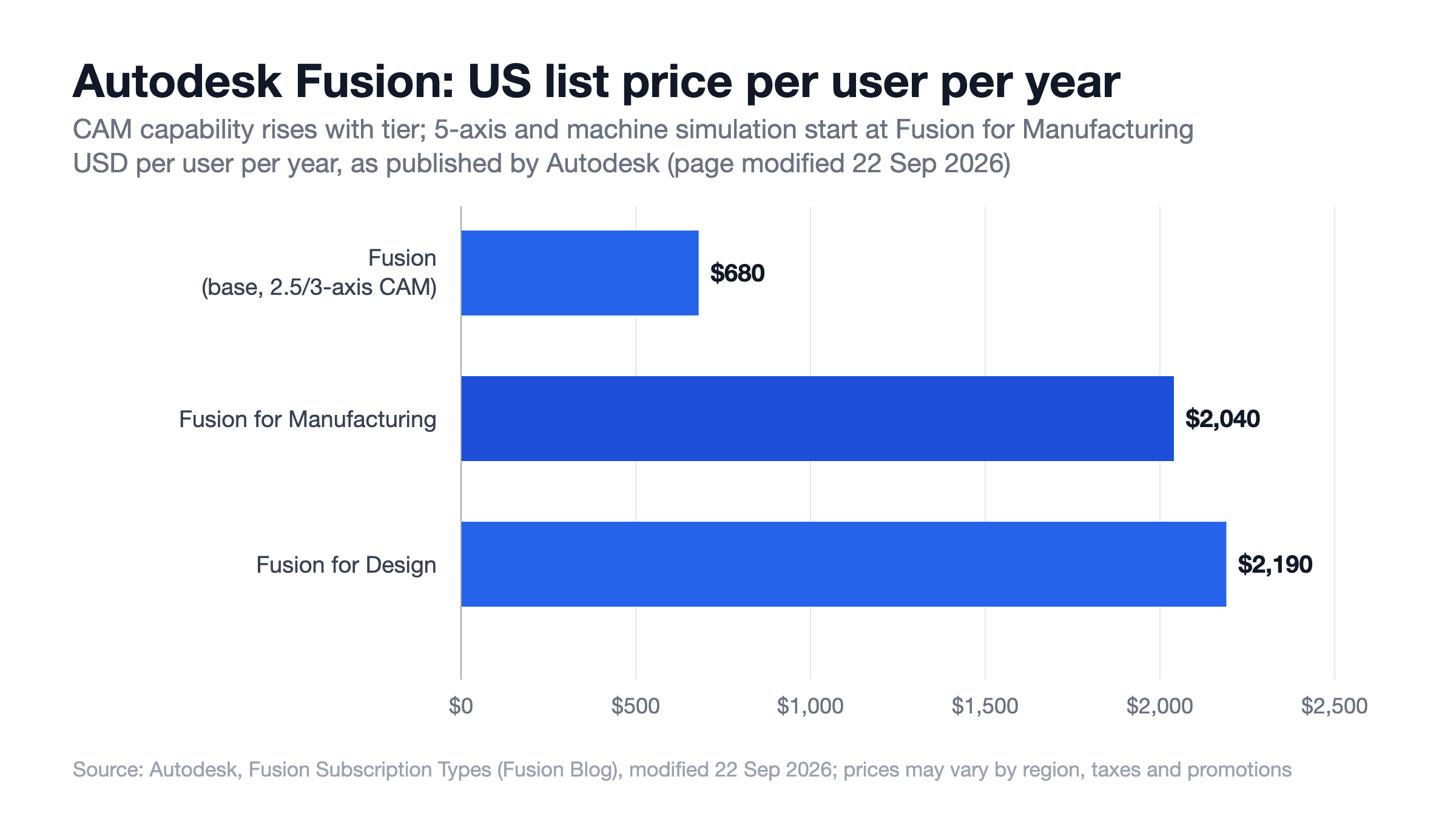
Fusion’s published US list prices per user per year are $680 for Fusion, $2,040 for Fusion for Manufacturing and $2,190 for Fusion for Design. Autodesk adds that pricing “may vary by region, taxes, and promotions”. As a worked example, one Fusion for Manufacturing seat at today’s list price comes to $10,200 over five years, before tax, training or posts, and assuming the price does not change.
Mastercam’s buying page describes two licensing options:
- Subscription: renting a licence for a term, at lower upfront cost.
- Perpetual: a “lower price over time”, paired with Mastercam CONNECT for upgrades during the Maintenance term.
Its 2025 EULA states that a perpetual licence excludes Maintenance. If Maintenance lapses, you lose updates, upgrades and technical support, which matters when a new machine needs a new or edited post.
With SOLIDWORKS CAM Standard, the dependency runs the other way. Because it comes with an active SOLIDWORKS subscription, ask your reseller what happens to CAM access if the CAD subscription lapses.
Expect subscription to be the default offer. CIMdata notes that in design-focused MCAD “the transition to subscription is increasing growth rapidly”.
Cloud or desktop: where your design and NC data lives
Score data location as a real criterion. Cloud CAM stores your models, setups and toolpaths on the vendor’s infrastructure. You need to know where that infrastructure is, which contract terms apply, and how you get your data out.
Autodesk describes Fusion as “a cloud-based 3D CAD, CAM, CAE, and PCB software platform”. Its support page states that Fusion data is hosted on Autodesk-managed AWS accounts in the United States (east and west). Autodesk offers UK, Germany or Ireland storage regions for “select Autodesk products”, but that page does not list Fusion. EU-based teams with customer or export-control obligations should ask Autodesk directly rather than assume a European region.
Desktop products are not automatically local in every respect. Confirm where licence activation, cloud collaboration features and vendor-hosted backups send data. Then put the answers into the contract, using these contract clauses to ask for in cloud CAD and CAM agreements.
Support, resellers and the hiring pool
Support for CAM usually comes through a reseller, and resellers are consolidating. In 2024 about one-third of CAM end-user payments went to resellers and about two-thirds directly to software suppliers, according to CIMdata. CIMdata’s 2026 market analysis lists Sandvik as the 2025 acquirer of several Mastercam resellers: FASTech, Barefoot CNC, CAD/CAM Solutions, CamTech, ShopWare, MCAM Northwest, OptiPro Systems and QTE Manufacturing Solutions. It also notes that many companies are “buying up their VARs”.
Ownership changes can be fine, but they can also change who answers the phone. Ask each candidate’s reseller:
- Who supports us locally?
- Who writes and fixes our posts?
- What happens to our support agreement if you are acquired?
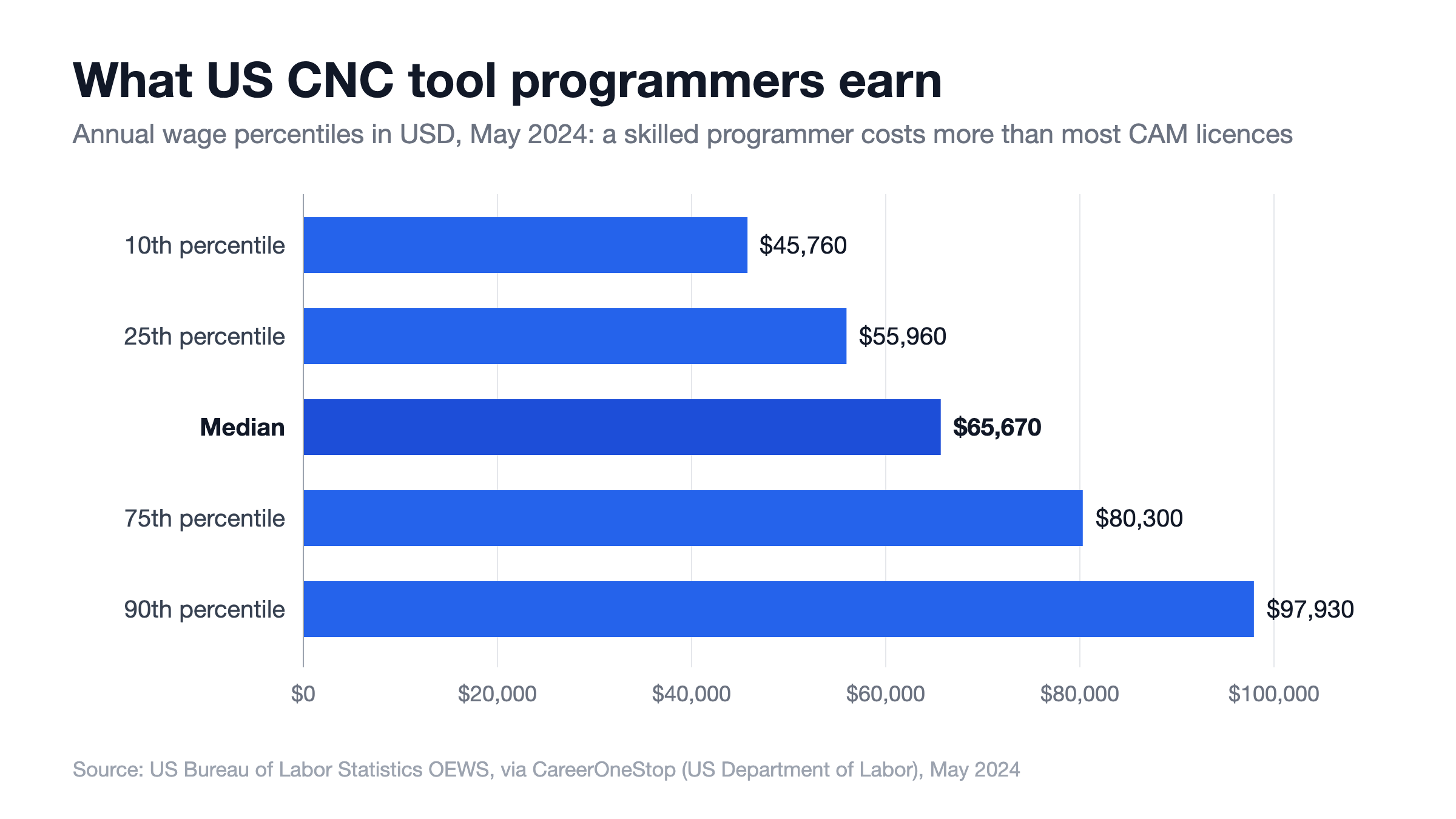
The hiring pool counts too. A package that local programmers already know cuts training time and hiring risk. US wage data from the Department of Labor’s CareerOneStop profile (BLS, May 2024) puts the median CNC tool programmer at $65,670 a year, with a range of $45,760 at the 10th percentile to $97,930 at the 90th. The US had about 28,500 CNC tool programmers in May 2025, up from 28,030 in May 2023. The largest employing industry in 2023 was machine shops and turned-product and fastener manufacturing. These figures are US-only, but the point carries elsewhere: programmer time costs far more than any licence in this guide.
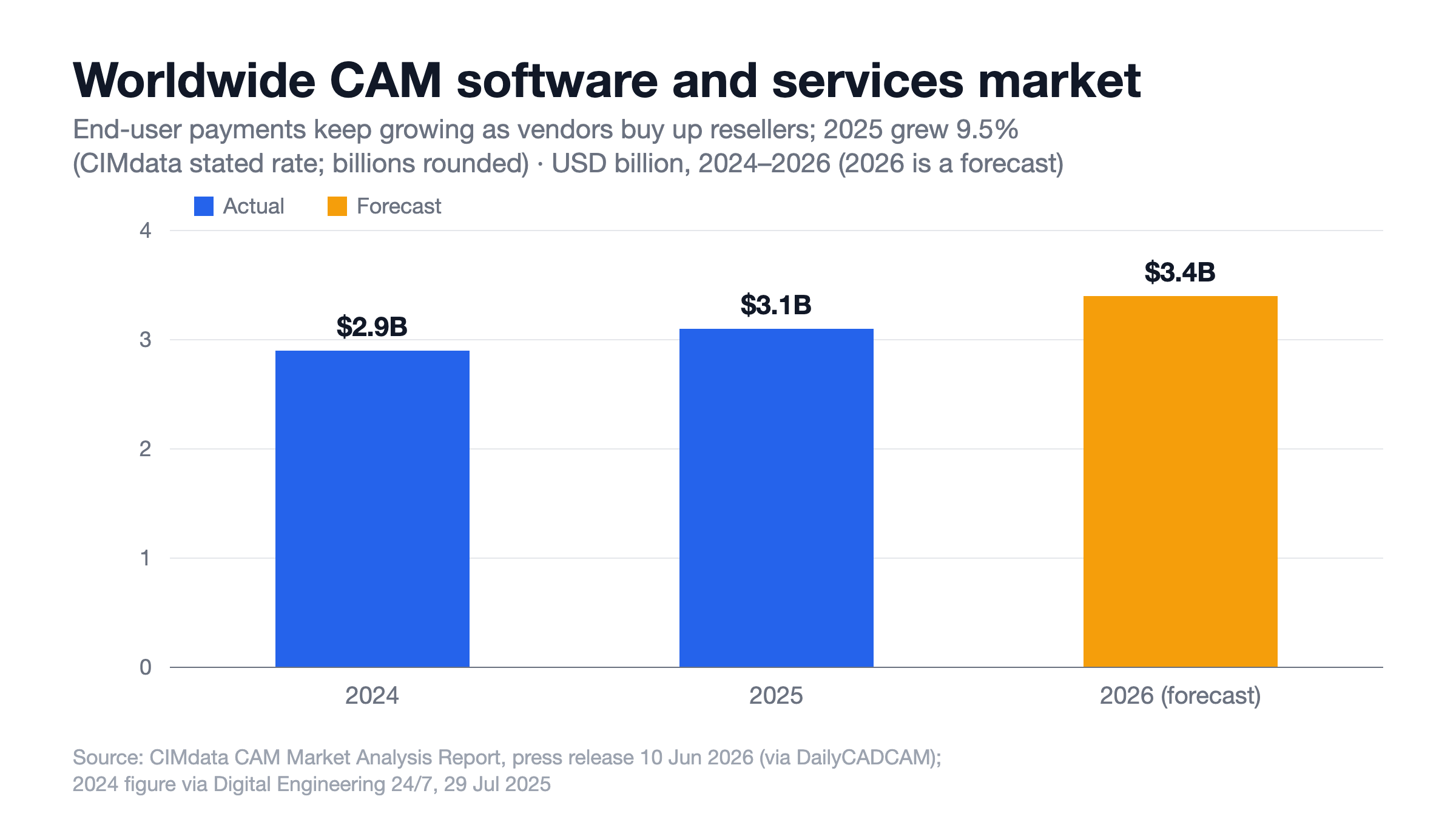
The market these vendors compete in is growing. CIMdata’s June 2026 CAM report puts worldwide CAM software and services payments at about $2.9 billion in 2024 and $3.1 billion in 2025. CIMdata states the 2025 growth rate as 9.5%; the billion figures are rounded. It forecasts $3.4 billion for 2026 and says CAM purchases are tied particularly to machine tool sales. For the vendor announcements, acquisitions and startup funding behind that growth, each dated and labelled as shipped, beta or planned, see our dated overview of the CAD/CAM trends and CAM startups shaping 2027.
How to run a trial: a benchmark-part plan
A trial turns the scorecard from opinion into evidence. Supply your own parts rather than letting the vendor choose the demo part, and run the same steps on every candidate.
- Pick three test files. Use one typical part, one hard part that pushes your machining scope, and one real customer STEP or Parasolid file.
- Program all three in the exact tier and add-ons you would buy, not a fully loaded trial version.
- Post to your own controller. Prove the code out with a dry run or single-block mode before cutting metal. Note every manual edit the code needed.
- Make a design change. Move a hole, change a fillet and alter a pocket depth. Record which operations are flagged, which regenerate cleanly and which must be redone by hand.
- Import your tool library and print a setup sheet. Ask an operator whether they could run the job from it.
- Check where CAM files land. Confirm that toolpaths, NC files and setup sheets check into your PDM against the right revision.
- Test support. Send one real technical question and time the answer.
- Score immediately. Fill in the scorecard the same day while details are fresh.
Plan the calendar around trial lengths. Autodesk offers a 30-day Fusion trial, and existing subscribers can trial all extension types free for 14 days. Book machine time and the operator’s hours for prove-out before the trial clock starts.
Handing CAM data to suppliers and subcontract machinists
Most shops send some work out. What you send decides how much a subcontractor can do with it, and how much of your design it reveals. As a rule, send the least editable format that does the job and record what went to whom.
| What you send | What the machinist can do | What it reveals |
|---|---|---|
| Native CAD/CAM file | Edit the design and reuse your toolpaths | Full feature history, design intent, your machining method |
| STEP or Parasolid | Program from accurate geometry | Exact geometry, but no feature history |
| Drawing (PDF) | Read tolerances and notes | Dimensions and specifications |
| NC code and setup sheet | Run the job on a matching machine | Your strategy, tools, feeds and speeds |
Add this to the scorecard under data location. Check whether the CAD/CAM system can produce view-only or neutral exports, log sharing links, and revoke them after the job is done.
For files that must leave the company in editable form, compare DRM or IRM for files that leave your company. Then set permission controls for models, drawings and release packages. CADChain, which publishes this site, builds the Boris plug-ins that add rights control and ownership records inside CAD tools. That is one option among several, and for many shops a disciplined export policy is enough.
Frequently asked questions
Is the CAM that comes bundled with our CAD subscription enough to start with, and when do we outgrow it?
For 2.5D and 3-axis milling, it often is. Base Fusion covers 2.5- and 3-axis milling and turning, and SOLIDWORKS CAM Standard comes with an active SOLIDWORKS subscription. You outgrow bundled CAM when you need 3+2 or simultaneous 5-axis, mill-turn, machine-model simulation, or a post the bundled tier does not support. Confirm the exact split with the vendor.
Can we run integrated CAM for our own parts and a separate CAD-neutral CAM for customer jobs?
Yes, and many shops do. Budget for two sets of posts, two tool libraries and training in both systems. Keep one tool library as the master and export from it, so cutting data does not drift between the two.
What happens to our CAM files and NC programs if we stop paying the subscription or let maintenance lapse?
It depends on the licence. Under Mastercam’s EULA, a perpetual licence without Maintenance gets no updates, upgrades or technical support. For subscriptions and bundled CAM, ask the vendor in writing what access to files and the software remains. Proven NC programs are plain text for your machine, so store them, with setup sheets, in your own PDM or file system.
Can design engineers do their own CAM programming, or do we still need a dedicated CNC programmer?
In an integrated system, design engineers can usually program simple prismatic parts. Multi-axis work, post editing, fixturing and prove-out still need a programmer’s judgement. Given US median pay of about $65,670 a year for CNC tool programmers (May 2024), it makes sense to put that person’s time where it matters most.
What does it really cost to switch CAM systems when the current one still works?
The licence is the smallest part. Switching means rebuilding and proving out posts, re-creating tool libraries and templates, retraining, and reprogramming repeat parts. Many shops keep the old system for repeat jobs with proven NC code and move new work to the new system. Run the benchmark trial before committing, so the switching cost is weighed against measured gains.
Decide with the numbers, then reweight once
Total the weighted scores for each candidate. Then check the winner against the section on when integrated CAD/CAM is not the right choice. If most of your work is customer files, a high score for associativity should not decide it.
If two candidates finish within a few points of each other, let post-processor proof on your own machines and the quality of local support break the tie. Those two factors decide whether code runs on Monday morning.
Keep the completed scorecard. Re-score in 2027, or sooner if you buy new machines or win a major customer with a different CAD system. CIMdata ties CAM purchases closely to machine tool sales, and a new machine is the moment your CAM choice is tested hardest.