
PDM vs PLM: the short answer
PDM (product data management) controls CAD files and engineering data inside the engineering team. It tracks who is editing what, which revision is current and what has been released. PLM (product lifecycle management) runs the product record and the processes around it, such as change approvals, BOMs, quality and supplier collaboration, across engineering, manufacturing, quality, supply chain and service. Most small design teams need PDM first and add PLM when changes and sign-offs regularly cross department lines.
Siemens sells both and sums it up in one line: “PDM controls design data. PLM connects your business around that data.” Autodesk draws the same line within its own products. Vault is its PDM product, and its PLM capabilities come through Fusion Manage.
| Aspect | PDM | PLM |
|---|---|---|
| Scope | CAD files, drawings, technical documents | Product information and workflows from concept to end-of-life |
| Main users | Engineering teams | Engineering, manufacturing, quality, supply chain, service |
| Typical stage | Small to mid-sized design teams; TriMech suggests SOLIDWORKS PDM Standard for up to 3–5 users | Autodesk positions Fusion Manage for complex products and regulated processes |
| Change management | “Limited or manual” (Siemens) | “Full change workflows, approvals” (Siemens) |
| ERP, CRM, QA integration | “Rare” (Siemens) | “Designed for enterprise integration” (Siemens) |
| Example products | Autodesk Vault, SOLIDWORKS PDM, Onshape built-in PDM | Autodesk Fusion Manage, Siemens Teamcenter X |
| Entry list price | Vault Professional: $870 per user per year | Fusion Manage: about $1,115 a year; Teamcenter X Essentials: about $2,084 a year |
The change management and integration rows come from Siemens’ own comparison table, so treat them as a vendor’s view. Prices and their caveats are covered in the cost section below. As the next sections show, the boundary between the two is less tidy than the table suggests.
What PDM does
A PDM system replaces shared drives and file-name conventions such as “bracket_final_v3_REAL.sldprt”. It stores CAD files in a managed vault and keeps track of versions and revisions. It knows which parts are used in which assemblies and controls who can change released data. Autodesk describes Vault as covering engineering files, CAD data, revisions and design processes. If you are moving from 2D drawings to 3D part and assembly models at the same time, our guide on which teams gain most from 3D and the signals that show a PDM vault is due helps you decide which change to make first.
Higher PDM tiers go well beyond file control. According to Autodesk, Vault Professional already includes:
- change and release management
- BOM management
- multi-site collaboration
- integration with non-Autodesk CAD
SOLIDWORKS users have two PDM tiers. The reseller Javelin says PDM Standard comes with SOLIDWORKS Professional and Premium licences. PDM Professional is the product formerly called SOLIDWORKS Enterprise PDM. Add-ins, Dispatch, Card Lists and Categories are available only in Professional. Here is how another reseller, TriMech, sizes the two:
| Tier | Database | Recommended users (TriMech) |
|---|---|---|
| SOLIDWORKS PDM Standard | Microsoft SQL Express | Up to 3–5 concurrent users |
| SOLIDWORKS PDM Professional | Microsoft SQL Server Standard | 6+ users |
That is reseller guidance, not a hard limit. Dassault does not publish SOLIDWORKS PDM prices.
Cloud CAD tools take a different approach. Onshape sells CAD with PDM built in, and its Professional plan adds “Company-managed data”, “Release management” and “Advanced PDM”. There is no separate vault to install, but your PDM choice is tied to your CAD choice.
PDM organises files. It does not protect them once they are copied out. For SOLIDWORKS-specific risks such as configurations and design tables, see our guide to protecting SOLIDWORKS parts, assemblies and drawings.
What PLM adds on top
PLM manages processes and people outside engineering. Autodesk’s Fusion Manage buy page lists process templates for:
- new product introduction and development (NPI/NPD)
- change and release management
- BOM management
- supplier collaboration
- quality management
- portfolio and requirements management
Autodesk says these templates come “at no extra cost”. It names four user groups: engineering for change and release, manufacturing for process coordination, quality for approvals and compliance, and supply chain and operations for visibility. Most of the users a PLM system serves are not designers.
Traceability is the other big difference. In Siemens’ table, compliance and traceability is “Basic” in PDM and “Comprehensive with audit trails” in PLM. That matters most when an auditor or customer asks who approved a change and on what basis.
PLM is not ERP. Autodesk explains the split this way: PLM manages product data, lifecycle processes and engineering changes, while ERP manages financials, inventory, procurement and order fulfilment. A PLM system usually connects to your ERP rather than replacing it. If your real pain is stock levels or purchase orders, PLM will not fix it.
The line is a spectrum: buy capabilities, not labels
Product labels mislead in both directions. Siemens’ Teamcenter X tier table shows that Essentials, its entry PLM tier, covers six capabilities: MCAD data management, structure management with revisions in CAD, where-used, check-in/check-out, creating and uploading documents, and 3D view and markup. That is a PDM feature set.
Change management, project scheduling, requirements, reports and a “Consumer license for non-authors” start at Standard. Enterprise BOM, enterprise integration, manufacturing planning, quality and compliance management and service lifecycle management appear only in Premium.
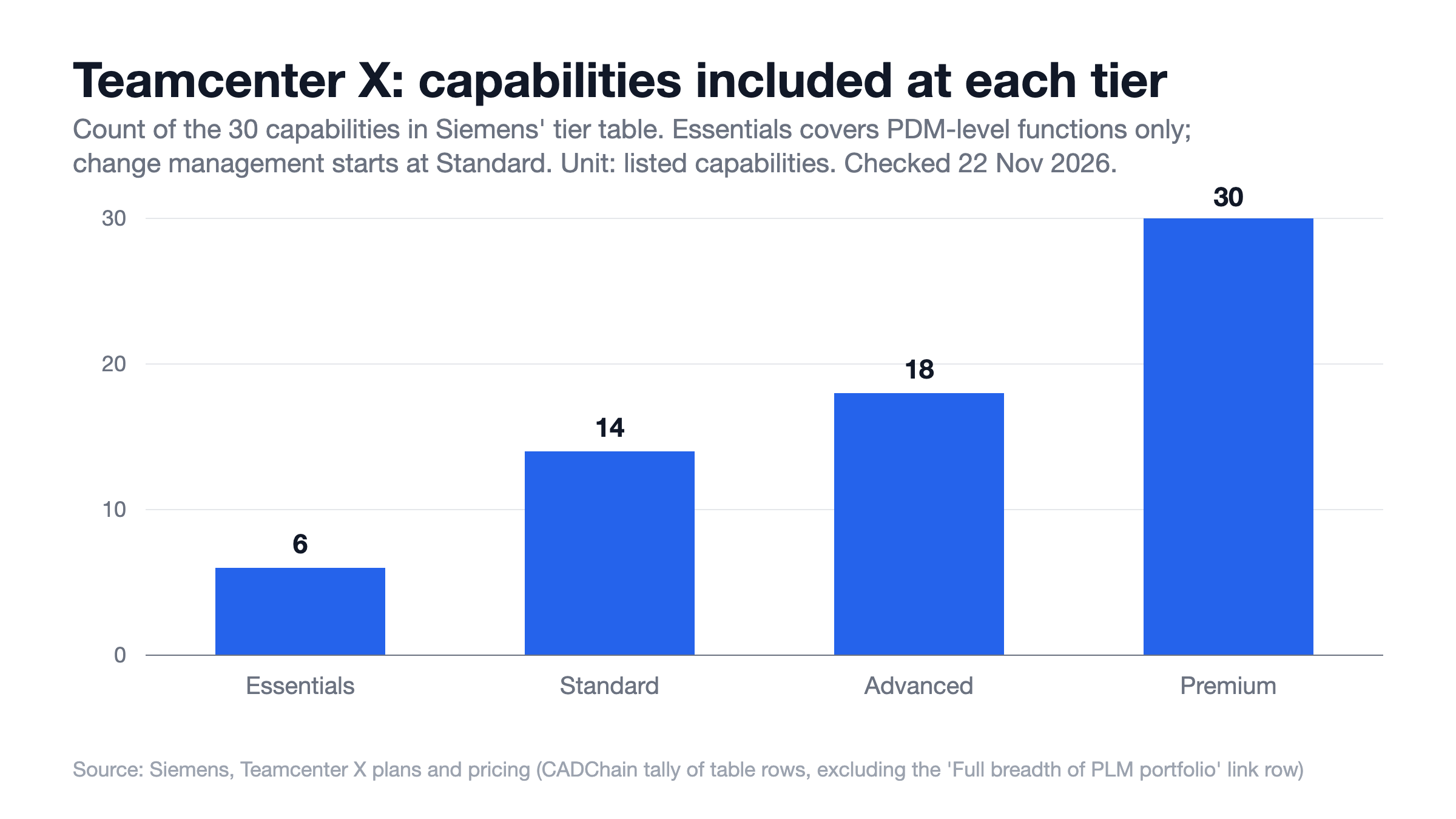
The counts are our tally of the rows in Siemens’ table, excluding the “Full breadth of PLM portfolio” link row. None of this makes Essentials a weak product. It shows what the label covers at that price point.
The overlap runs the other way too. Vault Professional, sold as PDM, already has change management and BOM management. Onshape’s Enterprise plan lists an “Arena PLM Connection”, so Onshape treats PLM as a separate product that you connect to.
So start with a list of the capabilities you actually need, then check each vendor’s tier table against it:
- controlled vault with check-in/check-out or version history
- revisions and release states
- where-used and assembly structure
- BOM management
- engineering change workflow with approvals
- low-cost viewer access for non-authors
- supplier or guest access
- ERP integration
- quality and compliance records
If your list stops around the change workflow, an upper PDM tier may cover it. If it runs to quality records and ERP integration, you are shopping for PLM, whatever the brochure calls it.
What PDM and PLM cost: published list prices and the licensing that drives the bill
These are list prices from vendor pages, checked on 22 November 2026. Real quotes vary with reseller, region, term length and add-ons, so use them to compare orders of magnitude, not to budget to the dollar.
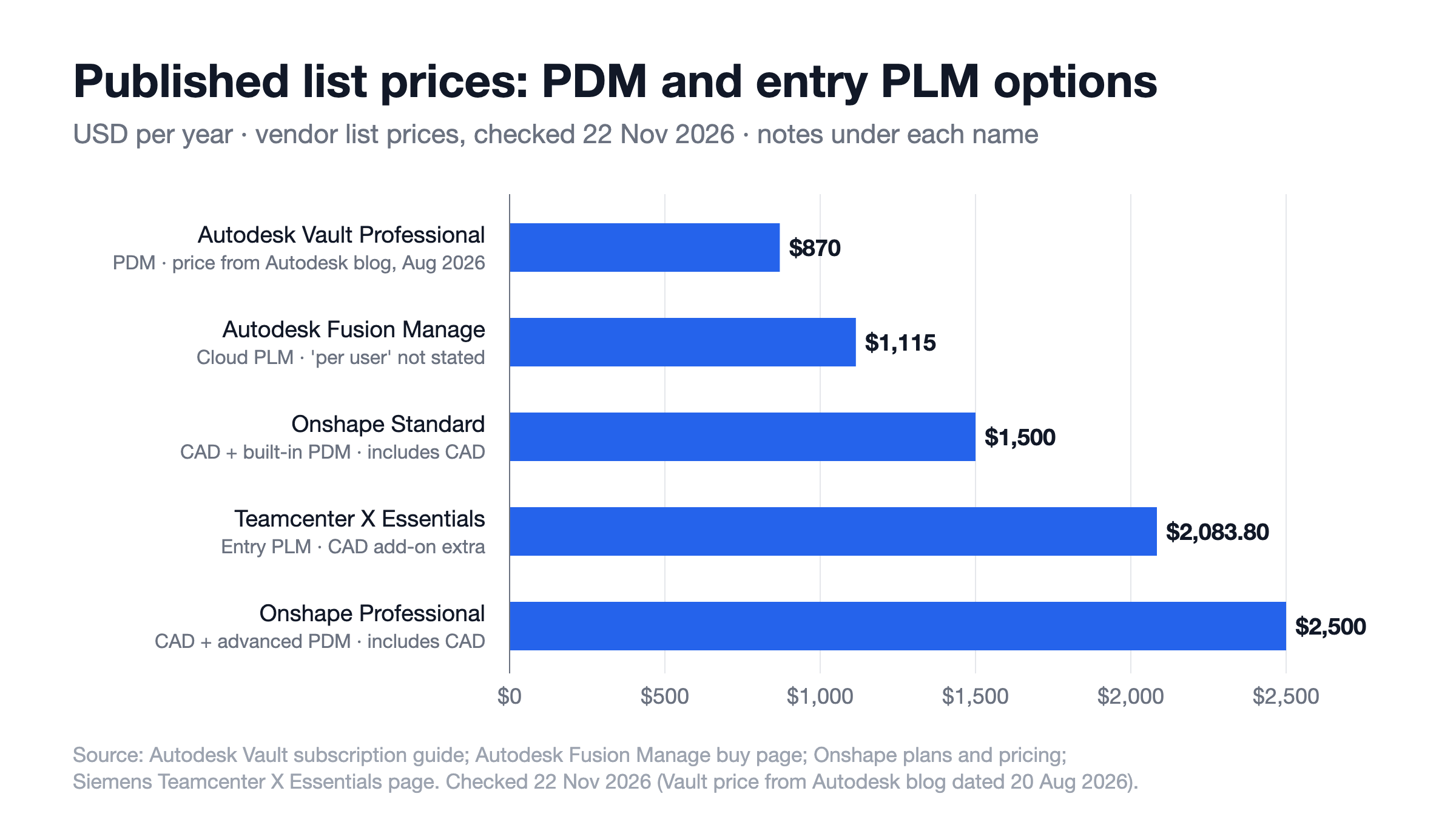
- Autodesk Vault Professional: $870 per user per year, as stated in Autodesk’s guide dated 20 August 2026. It is a named-user subscription, with Flex token-based access for occasional users. Autodesk notes that region, term, reseller discounts and enterprise agreements can change the price.
- Autodesk Fusion Manage: about $1,115, paid annually, according to Autodesk’s buy page. The page does not say “per user”, so confirm the unit with Autodesk. There is no trial, and it is sold separately from a Fusion subscription.
- Onshape: the Free plan costs $0 but all documents are public and it is for non-commercial use only. Standard is $1,500 and Professional $2,500 per user per year; Enterprise is by quote. Onshape’s prices include the CAD software, so they are not like-for-like with standalone PDM.
- Siemens Teamcenter X Essentials: about $2,084 a year, according to Siemens’ Essentials page (November 2026; may vary by region and currency). Each CAD user also needs a separate CAD integration add-on for SOLIDWORKS, Creo, Inventor or AutoCAD. Non-CAD users do not. A 30-day trial is available.
- Teamcenter X Standard, Advanced and Premium: by quote only. An AWS Marketplace listing from about October 2025 described quoted Teamcenter X deals as having a 20-user minimum plus one-time implementation. Treat that as applying to quoted deals, not to Essentials bought online.
- SOLIDWORKS PDM: no published price. The reseller GoEngineer says PDM Professional needs a separately purchased SQL Server Standard licence and a physical server, either on-premises or at a third-party host.
Licence structure usually matters more than the headline price:
- Named users: every author pays, so count people who create or change CAD data, not everyone who looks at it.
- Non-author roles: Vault Office for manufacturing, purchasing, quality and operations staff, Teamcenter’s consumer licence for non-authors (from Standard upward), and Onshape’s Light and Guest users.
- CAD integration add-ons: budget per CAD author where the vendor charges for them, as Teamcenter X Essentials does.
- Infrastructure: on-premises PDM may need database licences and a server. Cloud options move that cost into the subscription.
No reliable public source gives typical implementation costs or timelines, so ask each vendor or reseller for a written estimate. If you go with a cloud PDM or PLM, the agreement matters as much as the price. See the contract clauses to ask for in cloud CAD/PDM agreements.
Which one does your team need?
Decide by process, not by headcount. Map where engineering changes start, who approves them, who needs to see the data and who outside the company receives it. Then match that map to the capability list above.
PDM is enough when…
- Most changes start and finish inside engineering, and a lead engineer’s sign-off is the approval.
- A small number of people author CAD data. TriMech’s sizing for SOLIDWORKS PDM is one reference point.
- BOMs live in CAD/PDM or are passed to ERP without a formal multi-department review.
- You have no regulated process that needs traceable sign-off from quality, manufacturing and engineering together.
- Your change workflow fits what an upper PDM tier offers, such as Vault Professional’s change and release management, or Onshape Professional’s release management if you already design in Onshape.
Signs you need PLM
Siemens, a PLM vendor, lists five signs that a company is outgrowing PDM:
- rework caused by outdated product data
- siloed communication between engineering and operations
- manual change-request processes
- no support for multi-site teams or supply-chain coordination
- regulatory traceability needs that span several systems
The list is useful, but it comes from a company that sells the upgrade. If only one sign applies, check first whether a better PDM tier or a defined process fixes it. If that sign is rework on the shop floor, the cause may sit in the hand-off between design and machining rather than in data management; our guide on keeping CAM toolpaths in step with design changes covers that case. Autodesk positions Fusion Manage for organisations that manage complex products and regulated processes, which is a fair test of whether you are its target customer.
Before choosing either, run through the CAD security checklist. It surfaces access, export and supplier-sharing requirements that should go on your capability list.
The usual path from PDM to PLM
Most teams add PLM on top of PDM rather than replacing it. Autodesk says many organisations start with Vault and move into PLM as their processes mature. Siemens says you can add PLM later without “rip and replace”. That is a vendor claim, so test it before you rely on it.
Ask any vendor three questions:
- Does the PDM keep running underneath the PLM, or must data move?
- How do BOMs and change records sync between the two, and in which direction?
- Which system is the record of truth for a released revision?
Where PLM is a separate product, as with Onshape and its Arena connection, these questions matter even more. For a layer-by-layer map of what moves between CAD, PDM, PLM and ERP, and the points where those syncs usually fail, see our guide on which way data flows in a CAD-to-PLM integration and what breaks.
What each does for CAD data control
For IT and security leads, these are the controls PDM and PLM provide over CAD data, and their limits.
Check-in/check-out and locking
Classic PDM locks a file while one person edits it. When they check it back in, others can see the new version. Teamcenter X lists check-in/check-out in every tier, and non-CAD Essentials users can check designs in and out in the CAD-neutral JT format.
Locking is not universal. Onshape’s cloud-native PDM advertises “No locked files or check-in/check-out issues” and relies on full edit history and version control instead. Both approaches prevent silent overwrites. They differ in how parallel work is handled.
Revisions and release states
A version is a saved iteration, often created at each check-in. A revision is a formal release, such as A, B or C, that others can build from. In Vault, lifecycle states such as Work in Progress, Review and Released mark where a file stands, and transition rules govern how it moves between them. A lifecycle can automatically revise a file when its state changes. State security then decides who can do what in each state, for example making Released files read-only for most users.
Access rights
Vault has three security layers:
- Role-based: sets access where no object-level security is defined.
- Object-based: sets access on specific files, folders, items or custom objects.
- State-based: follows the lifecycle state and overrides object-based security.
Access control lists set which members can reach which objects and at what level. Overrides can be set by hand or applied automatically through lifecycle-state security. Autodesk’s description of the layering is in older help pages, but the 2026 help confirms that state security still exists. Other vendors use different models, so check each one. For the design work itself, see how to design role- and state-based permissions for CAD files.
Audit trails
Siemens presents comprehensive audit trails as a PLM trait. Some PDM-level tools log a lot too. Onshape’s “IP Audit Trail” keeps “a full history of user actions, such as exports, copies, and access locations”. It is offered on Onshape’s higher plans, so check the plan table for which one. Onshape Enterprise also lists role-based access control, SSO and an “Analytics & Intellectual Property (IP) Tracking Dashboard”. When comparing products, ask whether downloads and exports are logged, not only edits.
Sharing with suppliers
- Onshape: guest users are temporary accounts for clients, contractors or suppliers. Admins control how long access lasts and what guests can see or modify. Sharing ranges from full editing to view-only or comment-only.
- Fusion Manage: lists supplier collaboration as a core process.
- Teamcenter: Siemens names supplier collaboration as part of the move from PDM to PLM.
- Vault: offers a browser-based Thin Client and a mobile app for non-CAD stakeholders.
Where control ends: exported files and email attachments
PDM and PLM permissions, lifecycle states and logs apply to objects inside the system. Vault’s access control lists, for example, govern files, folders, items and custom objects in the vault. When someone exports a STEP, DWG or PDF and emails it to a supplier, the copy sits outside the vault. The permissions do not travel with it, and neither system controls what the recipient does next. Onshape logs the export itself as an audit event, which marks the point where in-system tracking stops.
For files that must reach outside partners, you have four options, and they can be combined:
- Keep the supplier inside the system. Use guest accounts or view-only and comment-only sharing where your product supports it, so there is no file to forward.
- Protect the exported file. Use DRM or IRM for files that leave the vault. For how this connects to a lifecycle system, see how rights management can work alongside a PLM system.
- Set the terms. Put use, retention and return-or-delete obligations in writing; see our supplier agreement terms for CAD data.
- Record ownership. A file fingerprint and timestamp created at the moment of sharing shows what you sent, to whom and when. CADChain’s Boris plug-ins are one option for these ownership records and for rights control on files that leave the vault. They work alongside PDM or PLM and do not replace either. If all your supplier work happens inside guest accounts, you may not need them.
Frequently asked questions
Does SOLIDWORKS come with PDM, or do we have to buy it separately?
According to the reseller Javelin, SOLIDWORKS PDM Standard comes with SOLIDWORKS Professional and Premium licences. PDM Professional, which adds features such as Dispatch, add-ins, Card Lists and Categories, is a separate purchase. Dassault does not publish its price, so ask a reseller for a quote.
Can a cloud CAD tool with built-in PDM replace a separate PDM system?
It can if your team designs in that tool. Onshape includes PDM in its paid plans and adds release management and advanced PDM on Professional. It does not manage files from your desktop CAD tools in the same way, so in practice switching PDM also means switching CAD.
Do suppliers, purchasing or shop-floor staff need a full paid licence to view files in PDM or PLM?
Usually not. Autodesk offers Vault Office for manufacturing, purchasing, quality and operations staff. Teamcenter X offers a consumer licence for non-authors from the Standard tier. Onshape has Light and Guest users. Non-CAD Teamcenter X Essentials users also do not need the CAD integration add-on.
Do we need our own server to run PDM?
That depends on the product. GoEngineer says SOLIDWORKS PDM Professional needs a SQL Server Standard licence and a physical server, either on-premises or hosted by a third party. PDM Standard runs on SQL Express. Cloud options such as Onshape, Teamcenter X and Fusion Manage are delivered as subscriptions without your own server.
Can we add PLM later without migrating everything out of our PDM?
Autodesk and Siemens both describe PLM as something you add on top of PDM, and Siemens claims there is no “rip and replace”. Before buying, get written answers on whether the PDM stays in place, how BOMs and change records sync, and which system holds the released revision.
Is a PDM or PLM audit trail enough to show who had a design and when, if a supplier dispute comes up?
It shows what happened inside the system, such as access, edits and, in some products, exports. It does not show what happened to a copy after export, and the log is held by you or your vendor. Independent records of exactly what you shared, made at the time you shared it, add another layer of evidence. Ask your legal adviser what your contracts and jurisdiction require.
Next step: map your process before you request quotes
Write down who authors CAD data, who approves changes, who only views, and which partners receive files. Turn that into the capability list from the spectrum section and send the same list to each vendor. Their answers, priced with named, non-author and add-on licences, will tell you whether you need PDM, PLM or a higher PDM tier.