Protecting Autodesk Inventor Files: Practical Guide For Engineering Teams
Use this Protecting Autodesk Inventor Files guide to protect IPT, IAM, IDW and DWG files, iLogic rules and manufacturing exports, reduce exposure from full Inventor workspaces moving to suppliers without scope separation and keep better evidence for CAD and engineering IP decisions.
Summary
Protecting Autodesk Inventor Files is about keeping IPT, IAM, IDW and DWG files, iLogic rules and manufacturing exports under the right level of control as work moves from design to review, partner collaboration and manufacturing. The strongest approach combines clear ownership, named access, action-level permissions and proof records that survive beyond a single folder or software tool.
For engineering teams that share native models, drawings and manufacturing files with employees, suppliers and partners, the key is to connect policy to daily engineering work. The control should explain which files matter, which actions are allowed, which exceptions need approval and which evidence proves the decision later.
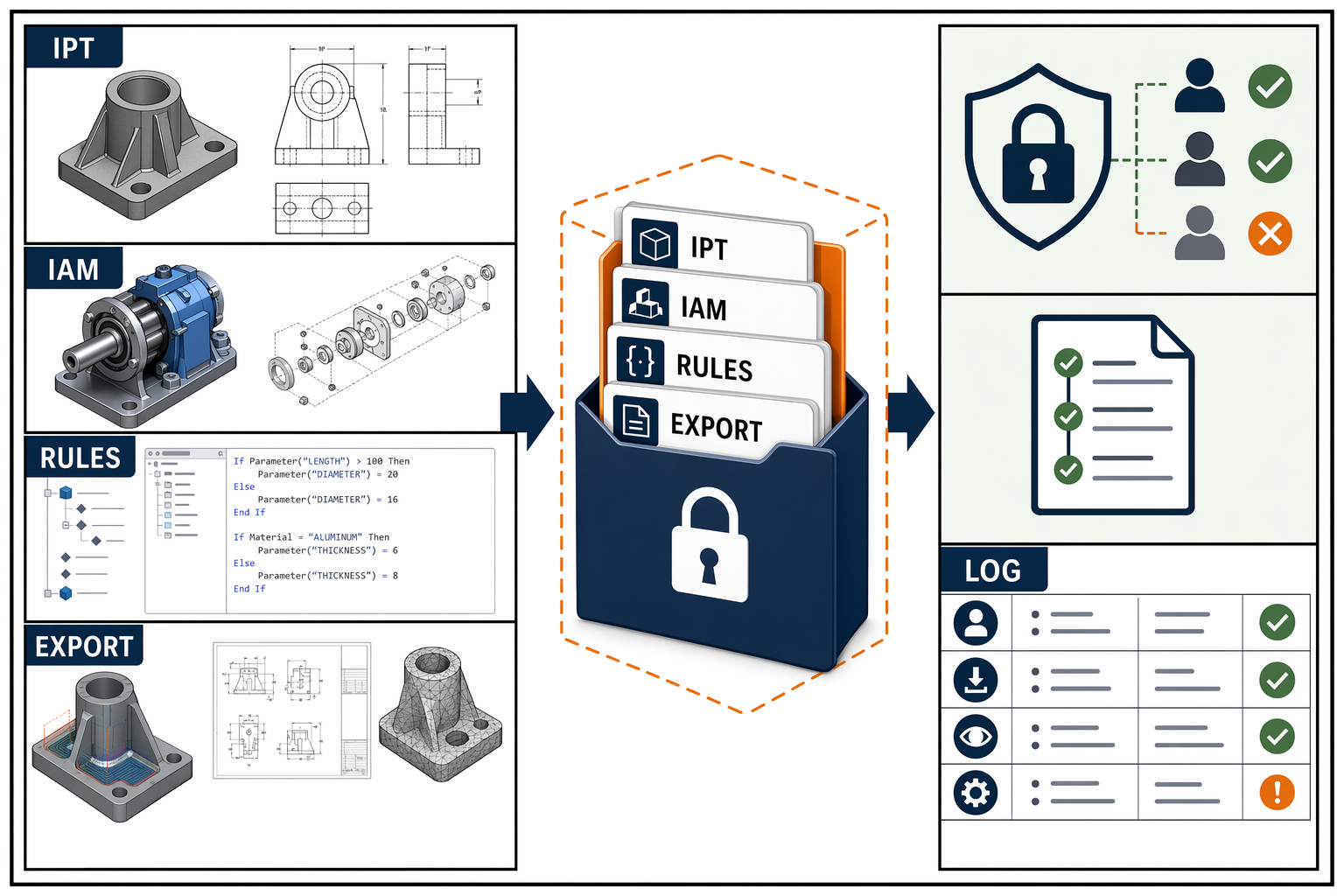
Inventor workspaces need controls for files, assemblies, rules and manufacturing exports before a supplier packet leaves the team.
Why Protecting Autodesk Inventor Files Matters
The main risk behind Protecting Autodesk Inventor Files is full Inventor workspaces moving to suppliers without scope separation. That creates security, ownership and operating risk because a design file is not only a drawing. It may carry geometry, tolerances, feature history, material choices, manufacturing assumptions, metadata and commercial know-how.
Engineering teams often focus on the master CAD model, but exposure usually appears in side files: exported STEP files, STL files, PDF drawings, supplier packets, local copies, shared folders and review links. A useful protection model treats these files as part of one design evidence chain.
The business risk is not limited to theft. Weak control can slow patent work, weaken trade-secret claims, complicate supplier disputes, delay audits, create export or privacy concerns and make it harder to explain who had access at a specific time.
The operating principle
Protect the design asset, the action and the evidence together. If one layer is missing, the team may still have a file but not a defensible record of how it was controlled.
What To Include In Scope
A strong review starts with scope. The team should define what counts as sensitive, where those files live, who uses them and which derivative files carry the same value as the original model.
For this topic, the core scope includes IPT, IAM, IDW and DWG files, iLogic rules and manufacturing exports. It should also include the collaboration paths that surround those assets: supplier links, email attachments, PLM records, export folders, review portals, issue trackers and archived releases.
Asset Scope
Document the files, derivatives and records connected to Protecting Autodesk Inventor Files so the team is not protecting only the obvious master file.
User Scope
List named users, supplier contacts, reviewers, approvers and service accounts. Shared accounts should be removed from sensitive workflows where possible.
Action Scope
Separate view, edit, approve, export, print, download, reshare, archive and revoke actions. Each action has a different risk profile.
Evidence Scope
Keep Inventor release records, package manifests and file fingerprints. Evidence should connect to the file version and the access decision.
A Practical Framework
The framework below keeps the work practical. It avoids a paper-only policy and ties control decisions to engineering events that already happen: design review, supplier handoff, release, production change and dispute response.
Classify Before Sharing
Mark the file group by value and sensitivity before access expands. Classification should cover IPT, IAM, IDW and DWG files, iLogic rules and manufacturing exports.
Use Named Ownership
Every sensitive file group needs an owner who approves access, accepts exceptions and decides when a review is required.
Limit Risky Actions
Viewing a file is not the same as exporting or resharing it. Risky actions need separate permission and stronger logging.
Review Partner Access
External access should be limited by purpose, file package and time window. Supplier access should not remain open by default.
Keep Proof With The File
The evidence record should include Inventor release records, package manifests and file fingerprints and should follow the file as it moves through systems.
Retire Access Cleanly
Access should end when work ends, a person leaves, a contract closes or a file is superseded by a new release.
Implementation Steps
The safest implementation path is incremental. Begin with the highest-value files and the most common sharing moments. Build evidence as you improve control, so the team can show progress and not only describe intent.
Name The File Group
Define the files and records covered by this topic. Include native files, exports, drawings and supporting evidence.
Assign An Owner
Give the file group a business and technical owner. The owner approves access and decides what needs review.
Map Current Access
List who can view, edit, export, download, print and reshare the files today. Include suppliers and old accounts.
Separate Actions
Turn broad folder access into action-specific rights. Export and reshare deserve separate review because they create new copies.
Clean The Package
Remove unnecessary files, metadata, old versions and unrelated references before any handoff.
Record Approval
Capture who approved access, why it was needed, when it starts, when it ends and which file version is involved.
Monitor Exceptions
Review unusual downloads, urgent exports, expired links and supplier access that stays active after work ends.
Review And Improve
Use audit findings, supplier feedback and incident reviews to adjust the control model without slowing ordinary engineering work.
Evidence And Ownership Records
Evidence is what turns a control into a defensible record. A team may have reasonable settings today, but a later dispute or audit asks what happened earlier. The answer needs timestamps, access records and file identity, not memory.
For Protecting Autodesk Inventor Files, useful evidence includes Inventor release records, package manifests and file fingerprints. When the design value is high, teams should also keep file hashes, approval history, export records, supplier terms and release notes that show how the asset moved over time.
CADChain fits here by helping teams create stronger proof around design files through file fingerprints, timestamps and evidence trails. That proof supports access control, rights management, supplier governance and ownership discussions.
Good evidence is boring on purpose
The record should be simple enough to review under pressure. It should show the file, the user, the action, the date, the reason and the approval without forcing a team to reconstruct events from scattered messages.
Checklist
Use this checklist before widening access, sending files outside the company or relying on a design record during funding, compliance or dispute work.
- The sensitive file group has a named owner.
- Native files and derivative files are both in scope.
- View rights are separated from export rights.
- Supplier access is limited by purpose and time.
- Metadata and old references are reviewed before sharing.
- Each exception has a reason, owner and end date.
- The evidence record includes file identity and version.
- Approval records are kept with the file group.
- Shared accounts are removed from sensitive work.
- Access is reviewed after release or supplier change.
- Offboarding includes file access and export review.
- Backup and recovery cover the sensitive files.
- Legal or compliance review is triggered when needed.
- The team knows who can reshare sensitive files.
- Logs are retained for the required review window.
- The next review date is recorded.
Common Mistakes
Protecting Only The Master File
Exports, drawings, screenshots, tool files and supplier packets may expose the same know-how as the native CAD model.
Using Broad Folder Access
Folder access is easy to grant and hard to review. Sensitive design files need action-level decisions and expiry dates.
Skipping Supplier Cleanup
Suppliers often receive extra files because the handoff is rushed. The package should be scoped to the actual work.
Ignoring Old Access
Old links, old supplier accounts and former employees create exposure after the original need is gone.
Treating Logs As Optional
Without logs, the team may know the rule but not prove what happened when the file moved.
Letting Exceptions Become Normal
Urgent access should expire and be reviewed. Permanent exceptions weaken the whole control model.
Standards Notes
This guide is educational. Legal, regulatory and sector-specific decisions should be reviewed with qualified counsel or the responsible compliance owner. The references below help teams connect Protecting Autodesk Inventor Files to broader security, IP or compliance principles.
Related Reading
Continue with the core CADChain resources that help connect Protecting Autodesk Inventor Files to file security, access control, supplier handling and ownership proof.
Questions
What is Protecting Autodesk Inventor Files?
Protecting Autodesk Inventor Files is the practice of managing IPT, IAM, IDW and DWG files, iLogic rules and manufacturing exports so the right people receive the right access, the right evidence is retained and avoidable exposure is reduced.
Why does Protecting Autodesk Inventor Files matter for engineering teams?
It matters because full Inventor workspaces moving to suppliers without scope separation. Engineering teams need controls that match the way files move through design, review, supplier work and manufacturing release.
Who should own Protecting Autodesk Inventor Files?
Ownership usually sits with engineering leadership, security, IT and the person responsible for the affected design files. Legal or compliance teams should join when rights, regulated data or contracts are involved.
What should be reviewed first?
Start with the most valuable files, the people who access them, the actions they perform and the evidence available if a dispute or audit begins.
How does this connect to CAD file security?
It is one layer of CAD file security. It works with encryption, access control, rights management, supplier governance and ownership proof.
How does this connect to supplier sharing?
Supplier sharing needs narrower access than company-side access. The package should match the approved work, expire when work ends and leave a reviewable record.
Which files usually need the most control?
Released designs, unreleased products, regulated technical data, tooling files, manufacturing instructions and files that support patent or trade-secret value usually need stronger control.
What is the most common mistake?
The common mistake is treating all approved users the same. Viewing, editing, exporting, printing and resharing carry different levels of risk.
What evidence should be retained?
Useful evidence includes Inventor release records, package manifests and file fingerprints, plus approval records, supplier terms and exception notes when unusual access is allowed.
How often should teams review this area?
Review it when a design reaches release, a supplier changes, a user leaves, a contract ends, a filing is prepared or a security event occurs.
Does Protecting Autodesk Inventor Files require a new platform?
Not always. Many teams begin with better classification, named access, export review and evidence retention before adding specialized systems.
Where does encryption fit?
Encryption protects files at rest and during transfer. It does not replace decisions about who can use the file or which actions are allowed after access.
Where does blockchain proof fit?
Blockchain proof is useful when a team needs tamper-evident records around file timing, integrity or ownership. It should support the control model rather than replace it.
How should exceptions be handled?
Exceptions should have an owner, reason, time limit and review note. Unrecorded exceptions become long-term exposure.
What should small teams do first?
Small teams should list their highest-value files, reduce broad sharing, separate export rights from view rights and keep simple proof records.
What should larger teams add?
Larger teams should add integration with identity systems, PLM, monitoring, supplier review, formal approval records and periodic audits.
How does Protecting Autodesk Inventor Files affect IP disputes?
It helps show what file existed, who had access, which actions were allowed and what evidence supports the timeline.
Can this reduce supplier friction?
Yes. Clear file packages and permissions reduce back-and-forth because suppliers know what they may use, where to find it and when access ends.
What should be documented for leadership?
Leadership needs a concise record of file value, risk, owner, control gaps, planned fixes and evidence quality.
Where should readers go next?
Readers should use the CAD file security guide, compare related controls and review the checklist before widening access to sensitive design files.